
Advanced Amazon Repricer Considers Conditions & More

The latest update from the advanced amazon repricer, BQool Repricer, brings exciting new features designed to meet the evolving needs of Amazon sellers and provide smarter amazon repricing.
Overview
Improve Inventory Performance with the New Inventory Age Column
For Amazon resellers, maintaining healthy inventory levels is essential, especially with the Low Inventory Level Fee now in effect. BQool’s latest update enhances your inventory monitoring capabilities by introducing a new Inventory Age column on the Listing Management dashboard.
This new column gives you a more complete view of your inventory performance, helping you make more informed pricing decisions.
By understanding your inventory age, you can adopt more conservative repricing strategies to avoid low inventory fees or use more aggressive pricing for slow-moving items to help avoid long-term storage fees.
Reduce Low Inventory Fees with the Historical Days of Supply Condition
In response to Amazon’s Low Inventory Level Fee, BQool has updated its Conditional Repricer to help sellers better manage inventory and pricing.
The new Historical Days of Supply feature allows sellers to automatically adjust minimum prices as inventory approaches the 28-day threshold. This helps manage sales velocity and reduce the risk of low inventory fees.
In addition, the ability to customize repricing strategies with sub-conditions gives sellers even greater control over inventory management. For better results, we recommend regularly refining your pricing strategy to better manage low inventory situations.
How to Set Up the Historical Days of Supply Condition
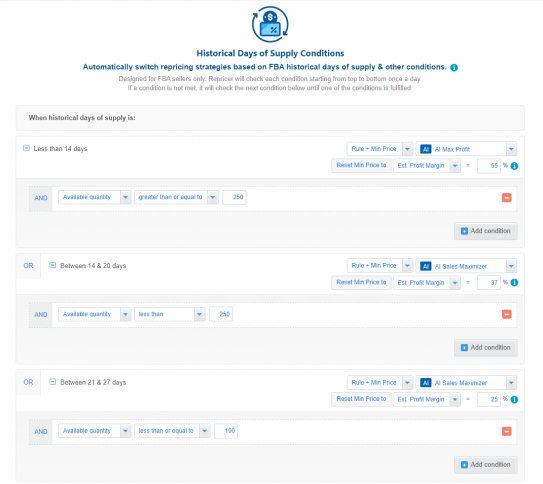
It’s important to note that every seller’s situation is unique. The strategy outlined below is simply an example of what is possible with Conditional Repricer. Your ideal strategy will depend on your product listings, business goals, and market conditions.
We suggest setting up a Days of Supply condition to adjust your pricing as stock levels decrease. When you have around 30 days of supply remaining, you can start gradually increasing your minimum prices.
As your supply reaches 14 days and then 7 days, you can apply larger price increases. This strategy helps protect your profit margins as inventory decreases.
For example, with 28 days of supply, you may aim for profit margins of 25–35%. At 14 days, you may target 35–45%, and at 7 days, you may aim for 45–60%.
You can also adjust your profit goals based on inventory age by aiming for higher profits on newer items and taking a more flexible approach with older inventory. This balanced strategy can help improve your overall repricing performance.
Refine Your Repricing Strategy with Additional Inventory Conditions
Conditional Repricer can automatically switch between different repricing rules and select the best repricing strategy for your listings based on the conditions you set.
Conditional Repricer follows a top-to-bottom approach. However, remember that your listing conditions on Amazon can change daily. Your listing may meet the first main condition for the next 24 hours, but the situation may change the following day.
If no condition is met, Conditional Repricer will switch to the safety net rule. Each time your listing data is updated, the repricer restarts and checks the conditions from top to bottom.
To master Conditional Repricer, you need to consider multiple metrics. This is key to understanding how the repricer will behave when applied to your listings.
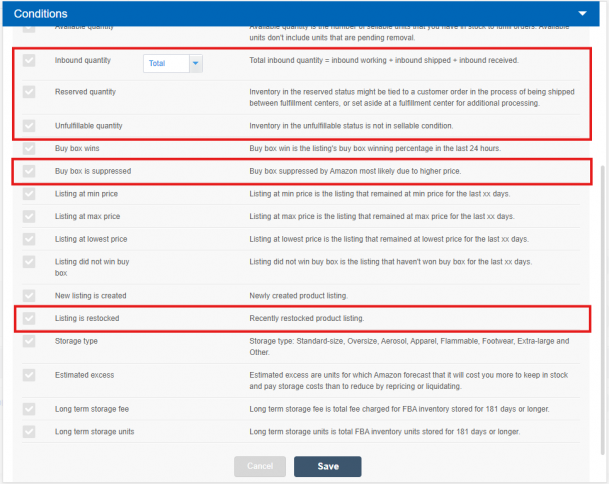
Inbound Quantity
By considering inbound quantity in your repricing strategy, you can improve inventory turnover and maintain competitiveness.
If inbound quantities are significantly higher than demand projections, we recommend using a more aggressive, sales-oriented repricing strategy to prevent excess inventory and maintain a healthy turnover rate.
Reserved Quantity Condition
Reserved stock refers to items that are unavailable for sale due to customer orders, inter-warehouse transfers, or lost inventory.
With the Reserved Quantity sub-condition, you may want to use a profit-oriented AI rule, such as Profit Maximizer, to avoid selling through your inventory too quickly. You can also use this condition to filter your listings.
Unfulfillable Quantity Condition
Amazon unfulfillable inventory includes items that are unsellable after an FBA warehouse quality inspection. The removal process and reasons for unfulfillable status may vary.
Sellers may need to adjust prices to maintain profitability despite unfulfillable stock. If unfulfillable quantities are high, we recommend increasing prices to help reduce potential losses.
Listing Is Restocked
Restocking your listings allows you to re-enter the market competitively. Repricing can help ensure your product is priced attractively compared to competitors.
For example, if you have a large amount of inventory, we suggest setting up a repricing strategy that helps move products quickly. If you have limited stock, you may be able to use higher pricing.
For newer products, especially those stored in the warehouse for fewer than 60 days, AI strategies such as AI Profit Booster or AI Profit Maximizer can help optimize for higher profit margins.
Keep your repricing strategy aligned with the nature of your products, whether they are fast-moving, seasonal, or slower-moving, to maximize both sales and profitability.
How to Reprice When the Buy Box Is Suppressed with Conditional Repricer
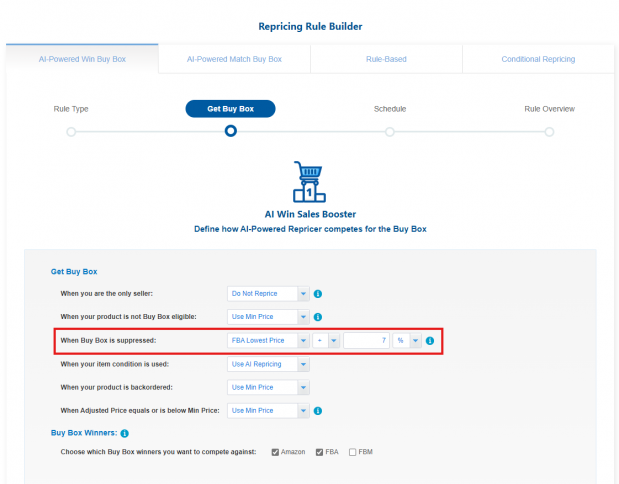
With the new “when Buy Box is suppressed” condition, managing suppressed Buy Box situations is now easier with BQool’s Conditional Repricer mode.
This condition simplifies the often frustrating process of dealing with a suppressed Buy Box, which is a common challenge for Amazon sellers.
As an FBA seller, your goal should be to compete with other FBA offers. Without the Buy Box, shoppers are often still willing to pay more for products from FBA sellers that are eligible for Prime shipping.
1) Set Up Your Repricing Rule in AI Repricer
To start, select an AI repricing rule. You can set up a condition within your AI Repricer for when the Buy Box is suppressed.
In these settings, configure the “Buy Box is suppressed” condition and select the FBA lowest price option.
2) Apply Your AI Rule to Conditional Repricer
Next, select the FBA Advanced Conditions in Conditional Repricer. In these advanced settings, choose the “Buy Box is Suppressed” condition from the list.
Then, apply the rule you previously created in AI Repricer. In our example, we labeled this rule “When Buy Box is Suppressed.”
Finally, you can add a rule that competes against all offers. In our example, we selected Rule AI Equalizer for when the Buy Box is no longer suppressed in Conditional Repricer.
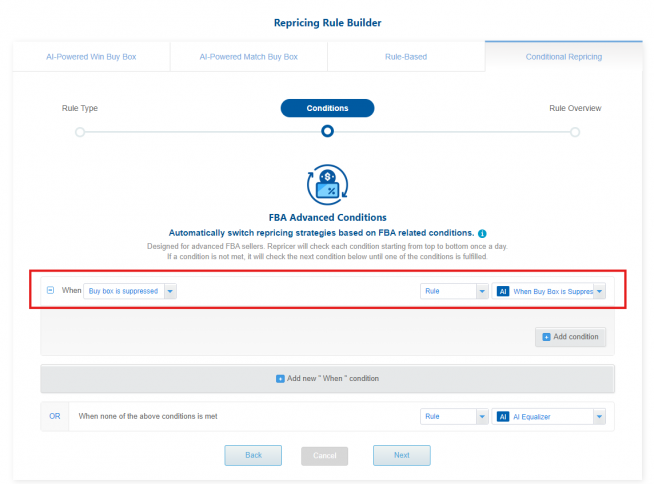
This rule helps ensure that once you win the Buy Box, your prices do not fluctuate too drastically, helping you stay in the Buy Box longer.
After regaining the Buy Box, be cautious. Overly aggressive pricing can quickly cause you to lose the advantage. We recommend using AI Equalizer to help maintain your position.
If you want to learn more about what a Suppressed Buy Box is and why it happens, you can check this article.

The latest update from the advanced amazon repricer, BQool Repricer, brings exciting new features designed to meet the evolving needs of Amazon sellers and provide smarter amazon repricing.
Overview
Improve Inventory Performance with the New Inventory Age Column
For Amazon resellers, maintaining healthy inventory levels is essential, especially with the Low Inventory Level Fee now in effect. BQool’s latest update enhances your inventory monitoring capabilities by introducing a new Inventory Age column on the Listing Management dashboard.
This new column gives you a more complete view of your inventory performance, helping you make more informed pricing decisions.
By understanding your inventory age, you can adopt more conservative repricing strategies to avoid low inventory fees or use more aggressive pricing for slow-moving items to help avoid long-term storage fees.
Reduce Low Inventory Fees with the Historical Days of Supply Condition

In response to Amazon’s Low Inventory Level Fee, BQool has updated its Conditional Repricer to help sellers better manage inventory and pricing.
The new Historical Days of Supply feature allows sellers to automatically adjust minimum prices as inventory approaches the 28-day threshold. This helps manage sales velocity and reduce the risk of low inventory fees.
In addition, the ability to customize repricing strategies with sub-conditions gives sellers even greater control over inventory management. For better results, we recommend regularly refining your pricing strategy to better manage low inventory situations.
How to Set Up the Historical Days of Supply Condition

It’s important to note that every seller’s situation is unique. The strategy outlined below is simply an example of what is possible with Conditional Repricer. Your ideal strategy will depend on your product listings, business goals, and market conditions.
We suggest setting up a Days of Supply condition to adjust your pricing as stock levels decrease. When you have around 30 days of supply remaining, you can start gradually increasing your minimum prices.
As your supply reaches 14 days and then 7 days, you can apply larger price increases. This strategy helps protect your profit margins as inventory decreases.
For example, with 28 days of supply, you may aim for profit margins of 25–35%. At 14 days, you may target 35–45%, and at 7 days, you may aim for 45–60%.
You can also adjust your profit goals based on inventory age by aiming for higher profits on newer items and taking a more flexible approach with older inventory. This balanced strategy can help improve your overall repricing performance.
Refine Your Repricing Strategy with Additional Inventory Conditions
Conditional Repricer can automatically switch between different repricing rules and select the best repricing strategy for your listings based on the conditions you set.
Conditional Repricer follows a top-to-bottom approach. However, remember that your listing conditions on Amazon can change daily. Your listing may meet the first main condition for the next 24 hours, but the situation may change the following day.
If no condition is met, Conditional Repricer will switch to the safety net rule. Each time your listing data is updated, the repricer restarts and checks the conditions from top to bottom.
To master Conditional Repricer, you need to consider multiple metrics. This is key to understanding how the repricer will behave when applied to your listings.

Inbound Quantity
By considering inbound quantity in your repricing strategy, you can improve inventory turnover and maintain competitiveness.
If inbound quantities are significantly higher than demand projections, we recommend using a more aggressive, sales-oriented repricing strategy to prevent excess inventory and maintain a healthy turnover rate.
Reserved Quantity Condition
Reserved stock refers to items that are unavailable for sale due to customer orders, inter-warehouse transfers, or lost inventory.
With the Reserved Quantity sub-condition, you may want to use a profit-oriented AI rule, such as Profit Maximizer, to avoid selling through your inventory too quickly. You can also use this condition to filter your listings.
Unfulfillable Quantity Condition
Amazon unfulfillable inventory includes items that are unsellable after an FBA warehouse quality inspection. The removal process and reasons for unfulfillable status may vary.
Sellers may need to adjust prices to maintain profitability despite unfulfillable stock. If unfulfillable quantities are high, we recommend increasing prices to help reduce potential losses.
Listing Is Restocked
Restocking your listings allows you to re-enter the market competitively. Repricing can help ensure your product is priced attractively compared to competitors.
For example, if you have a large amount of inventory, we suggest setting up a repricing strategy that helps move products quickly. If you have limited stock, you may be able to use higher pricing.
For newer products, especially those stored in the warehouse for fewer than 60 days, AI strategies such as AI Profit Booster or AI Profit Maximizer can help optimize for higher profit margins.
Keep your repricing strategy aligned with the nature of your products, whether they are fast-moving, seasonal, or slower-moving, to maximize both sales and profitability.
How to Reprice When the Buy Box Is Suppressed with Conditional Repricer

With the new “when Buy Box is suppressed” condition, managing suppressed Buy Box situations is now easier with BQool’s Conditional Repricer mode.
This condition simplifies the often frustrating process of dealing with a suppressed Buy Box, which is a common challenge for Amazon sellers.
As an FBA seller, your goal should be to compete with other FBA offers. Without the Buy Box, shoppers are often still willing to pay more for products from FBA sellers that are eligible for Prime shipping.
1) Set Up Your Repricing Rule in AI Repricer
To start, select an AI repricing rule. You can set up a condition within your AI Repricer for when the Buy Box is suppressed.
In these settings, configure the “Buy Box is suppressed” condition and select the FBA lowest price option.
2) Apply Your AI Rule to Conditional Repricer
Next, select the FBA Advanced Conditions in Conditional Repricer. In these advanced settings, choose the “Buy Box is Suppressed” condition from the list.
Then, apply the rule you previously created in AI Repricer. In our example, we labeled this rule “When Buy Box is Suppressed.”
Finally, you can add a rule that competes against all offers. In our example, we selected Rule AI Equalizer for when the Buy Box is no longer suppressed in Conditional Repricer.

This rule helps ensure that once you win the Buy Box, your prices do not fluctuate too drastically, helping you stay in the Buy Box longer.
After regaining the Buy Box, be cautious. Overly aggressive pricing can quickly cause you to lose the advantage. We recommend using AI Equalizer to help maintain your position.
If you want to learn more about what a Suppressed Buy Box is and why it happens, you can check this article.





Leave a Reply