
How to use an Amazon Repricer? A Beginner’s Guide
Selling on Amazon can lead to a thriving business, but it can also become a nightmare filled with seemingly unsolvable difficulties like lost profit, stranded inventory, and sleepless nights.
The key to turn your efforts into a success is not just automation. It is pricing strategically. To stay ahead of the competition and consistently win the Buy Box, you need to understand how repricing actually works and how to use it effectively.
In this article, we cover what an amazon repricer really is, and more importantly, how to use it to maximize profit while staying competitive.
If you’re more keen on watching, check out this video from Fields of Profit on how to use a repricer.
Overview
What is an Amazon repricer?
A repricer automatically adjusts your prices on Amazon based on competitors and your predefined rules.
But more importantly, a repricer is not just a tool for changing prices. It is a tool for winning the Buy Box while protecting your margins.
- Using a repricer frees up your time. Manually monitoring competitor prices becomes impossible as your business scales. A repricer automates this process so you can focus on sourcing and growth.
- Using a repricer software helps you stay ahead of competitors selling the same products. Amazon prices change constantly. A repricer reacts instantly to those changes, ensuring your listings remain competitive in real time.
- Using a repricer eliminates human error. A repricer follows your rules consistently, reducing the risk of costly pricing mistakes.
How to use an Amazon repricer (step-by-step)
To use a repricer effectively, you need more than just turning it on. You need the right setup and strategy.
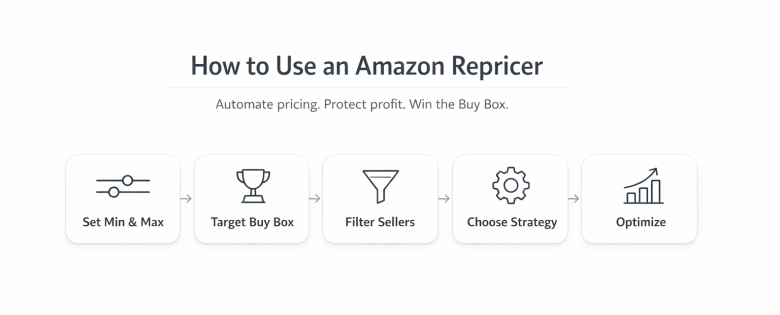
- Step 1: Set your minimum and maximum prices Your minimum price protects your profit, while your maximum price prevents Amazon from flagging your listing as too expensive.
- Step 2: Choose your competition target Always prioritize competing with the Buy Box price rather than the lowest price on the listing.
- Step 3: Filter your competitors Exclude sellers with poor feedback, slow shipping, or out-of-stock inventory.
- Step 4: Select your pricing strategy Decide whether to match, beat, or stay above competitors.
- Step 5: Monitor and optimize Review performance regularly and refine your rules.
How does a repricer work?
Repricing tools download your listing data automatically from Amazon using the APIs. They continuously analyze competing offers and adjust your price based on your rules.
Every time there is a price or position change on a listing, the repricer evaluates whether it should update your price to remain competitive.
If you’re interested in trying out BQool’s repricer, check out this video on how to set up one of the best repricers on the market for your amazon business.
Setting your min & max prices
Every repricer requires a minimum and maximum price to operate effectively.
A minimum price is your safety net. It ensures you never sell at a loss by factoring in all costs.
A maximum price is equally important. Amazon monitors listings for price fairness and may suppress listings that are priced too high. Your maximum price should be based on market data and historical pricing.
Setting both correctly ensures your repricer operates within safe and profitable boundaries. For more info on how to set your min and max prices, check out this article.
How to create the perfect repricing rule
Repricing rules determine how your prices adjust in response to competition.
- Always compete with the Buy Box not the lowest price Competing with the lowest price often leads to unnecessary price drops.
- Avoid penny undercutting This can trigger price wars and reduce margins.
- Leverage your fulfillment advantage FBA sellers can often price higher than FBM competitors.
- Exclude low-quality competitors Avoid sellers with poor feedback or unreliable fulfillment.
For more advanced repricing strategies:
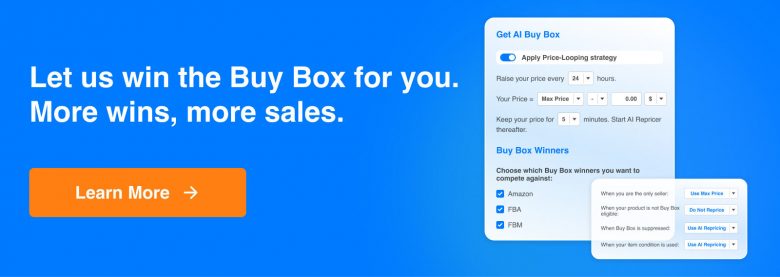
- Automated price increases: Raising prices during low-activity hours can encourage competitors to follow upward. This can be achieved with BQool‘s Price-looping feature under within their AI-Repricer’s Match Buy Box rules.
- Dynamic competition targeting: Adjust your strategy based on market conditions and specific competitors, to maximize profit.
Common repricing mistakes to avoid
- Competing with the lowest price instead of the Buy Box. This would eventually lead prices down quickly, and neither you or your competitors would make profit as the lowest price doesn’t always win the buy box.
- Setting no minimum price or setting it too low. Setting min/max prices are a crucial step to guide your repricing activities.
- Ignoring competitor quality and fulfillment type. Set your repricing rules according to your fulfilment method, whether that’s FBA/FBM.
- Treating repricing as set and forget. You must always monitor how the market responds to your pricing, and adjust accordingly.
Which Amazon repricing tool should I use?
When it comes to choosing the best Amazon repricing tool, there is no definite answer because every business has its own preference.
But, BQool’s Repricing Central is trusted by sellers worldwide for it’s highly customizable, highly affordable, and reliable services.
Selling on Amazon can lead to a thriving business, but it can also become a nightmare filled with seemingly unsolvable difficulties like lost profit, stranded inventory, and sleepless nights.
The key to turn your efforts into a success is not just automation. It is pricing strategically. To stay ahead of the competition and consistently win the Buy Box, you need to understand how repricing actually works and how to use it effectively.
In this article, we cover what an amazon repricer really is, and more importantly, how to use it to maximize profit while staying competitive.
If you’re more keen on watching, check out this video from Fields of Profit on how to use a repricer.
Overview
What is an Amazon repricer?
A repricer automatically adjusts your prices on Amazon based on competitors and your predefined rules.
But more importantly, a repricer is not just a tool for changing prices. It is a tool for winning the Buy Box while protecting your margins.
- Using a repricer frees up your time. Manually monitoring competitor prices becomes impossible as your business scales. A repricer automates this process so you can focus on sourcing and growth.
- Using a repricer software helps you stay ahead of competitors selling the same products. Amazon prices change constantly. A repricer reacts instantly to those changes, ensuring your listings remain competitive in real time.
- Using a repricer eliminates human error. A repricer follows your rules consistently, reducing the risk of costly pricing mistakes.
How to use an Amazon repricer (step-by-step)
To use a repricer effectively, you need more than just turning it on. You need the right setup and strategy.
- Step 1: Set your minimum and maximum prices Your minimum price protects your profit, while your maximum price prevents Amazon from flagging your listing as too expensive.
- Step 2: Choose your competition target Always prioritize competing with the Buy Box price rather than the lowest price on the listing.
- Step 3: Filter your competitors Exclude sellers with poor feedback, slow shipping, or out-of-stock inventory.
- Step 4: Select your pricing strategy Decide whether to match, beat, or stay above competitors.
- Step 5: Monitor and optimize Review performance regularly and refine your rules.
How does a repricer work?
Repricing tools download your listing data automatically from Amazon using the APIs. They continuously analyze competing offers and adjust your price based on your rules.
Every time there is a price or position change on a listing, the repricer evaluates whether it should update your price to remain competitive.
If you’re interested in trying out BQool’s repricer, check out this video on how to set up one of the best repricers on the market for your amazon business.
Setting your min & max prices
Every repricer requires a minimum and maximum price to operate effectively.
A minimum price is your safety net. It ensures you never sell at a loss by factoring in all costs.
A maximum price is equally important. Amazon monitors listings for price fairness and may suppress listings that are priced too high. Your maximum price should be based on market data and historical pricing.
Setting both correctly ensures your repricer operates within safe and profitable boundaries. For more info on how to set your min and max prices, check out this article.
How to create the perfect repricing rule
Repricing rules determine how your prices adjust in response to competition.
- Always compete with the Buy Box not the lowest price Competing with the lowest price often leads to unnecessary price drops.
- Avoid penny undercutting This can trigger price wars and reduce margins.
- Leverage your fulfillment advantage FBA sellers can often price higher than FBM competitors.
- Exclude low-quality competitors Avoid sellers with poor feedback or unreliable fulfillment.
For more advanced repricing strategies:
- Automated price increases: Raising prices during low-activity hours can encourage competitors to follow upward. This can be achieved with BQool‘s Price-looping feature under within their AI-Repricer’s Match Buy Box rules.
- Dynamic competition targeting: Adjust your strategy based on market conditions and specific competitors, to maximize profit.
Common repricing mistakes to avoid
- Competing with the lowest price instead of the Buy Box. This would eventually lead prices down quickly, and neither you or your competitors would make profit as the lowest price doesn’t always win the buy box.
- Setting no minimum price or setting it too low. Setting min/max prices are a crucial step to guide your repricing activities.
- Ignoring competitor quality and fulfillment type. Set your repricing rules according to your fulfilment method, whether that’s FBA/FBM.
- Treating repricing as set and forget. You must always monitor how the market responds to your pricing, and adjust accordingly.
Which Amazon repricing tool should I use?
When it comes to choosing the best Amazon repricing tool, there is no definite answer because every business has its own preference.
But, BQool’s Repricing Central is trusted by sellers worldwide for it’s highly customizable, highly affordable, and reliable services.






Leave a Reply