If you’re running ads on Amazon, your Amazon bidding strategy plays a critical role in campaign performance. But, higher bids don’t always mean better results, and lower bids don’t always save money.
In this guide, we’ll break down Amazon’s bidding strategies, when to use them, and how you could optimize bids over time.
Overview
- What Is an Amazon PPC Bid?
- Bid vs Bidding Strategy: What’s the Difference?
- Automatic vs Manual Targeting: The Foundation of Your Bidding Strategy
- Amazon Bidding Strategies Explained
- AI-Bidding vs Amazon Bidding Strategies Comparison
- Factors That Influence Amazon PPC Bid Optimization
- Advanced Amazon Bid Optimization Techniques
- Why Amazon Bid Management Requires Ongoing Optimization
- Why You Should Use AI-Bidding In Your Amazon PPC Strategy
- How BQool AI Advertising Automates Bid Optimization
- Conclusion
What Is an Amazon PPC Bid?
An Amazon PPC bid is the most you’re willing to pay when someone clicks on your ad. The bid helps Amazon decide whether your ad can compete for a spot in search results and how often shoppers may see it.
Your bid isn’t the only thing Amazon looks at, but it plays a big role. If your bid is too low, your ad may not get enough visibility. If it’s too high, you could end up spending more without getting better results.
That’s why bidding is one of the most important parts of Amazon advertising. The right bid can help you attract more shoppers while keeping your advertising costs under control.
Bid vs Bidding Strategy: What’s the Difference?
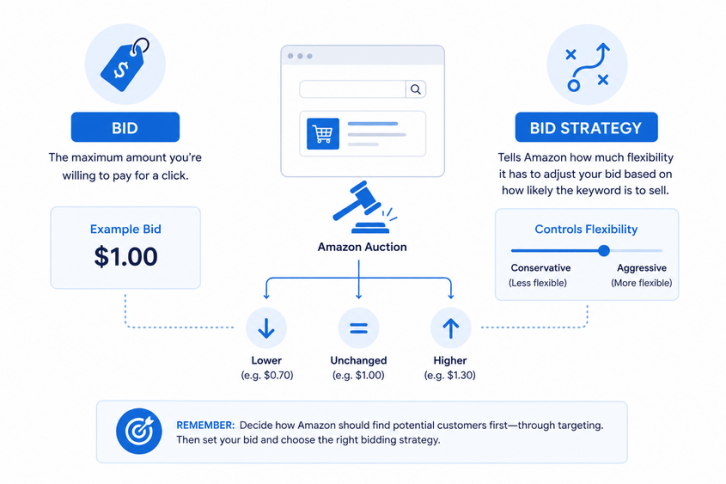
A bid and a bidding strategy work together, but they’re not the same. Your bid is the maximum amount you’re willing to pay for a click, whereas your bidding strategy tells Amazon how much flexibility it has to adjust to that bid based on how likely that keyword is to make a sale.
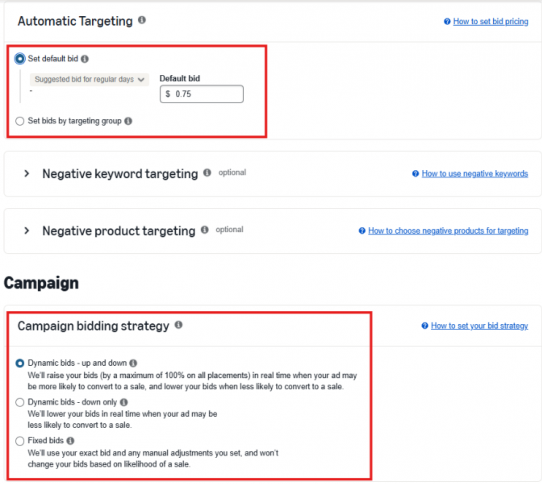
For example, if your keyword bid is set at $1.00, Amazon may lower it, raise it, or leave it unchanged depending on the bidding strategy you’ve chosen.
This is why two campaigns with the same keyword bid can perform very differently. The bid sets the starting point, while the bidding strategy determines how aggressively Amazon competes in each auction.
Before deciding how much to bid, you first need to decide how Amazon should find potential customers. That’s where targeting comes in.
Automatic vs Manual Targeting: The Foundation of Your Bidding Strategy
Before setting bids or choosing a bidding strategy, you first need to decide how Amazon will find potential customers for your products. Amazon Sponsored Products offers two targeting approaches: Automatic Targeting and Manual Targeting. Which serve different purposes.
| Automatic Targeting | Manual Targeting |
|---|---|
| Amazon selects keywords and products automatically | You choose the keywords or products to target |
| Quick and easy to launch | Requires more setup and ongoing management |
| Great for keyword discovery and product launches | Ideal for optimization, scaling, and greater control |
| Less control over traffic sources | Full control over targeting and bids |
| Helps uncover new opportunities | Helps maximize performance from proven targets |
Your targeting strategy comes first because you first need to decide who you want your ads to reach. Once you’ve chosen who you want to reach, you can set bids for those targets and decide how much flexibility Amazon has to adjust them during an auction.
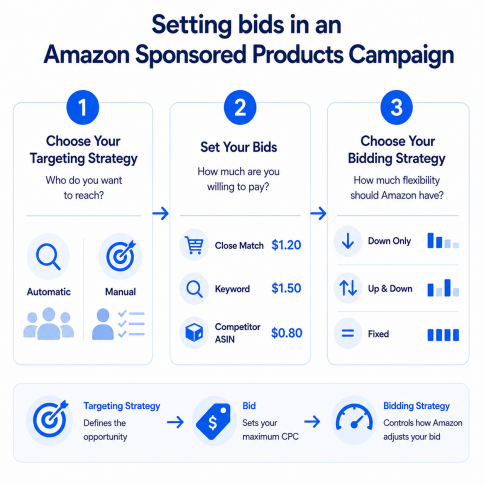
Let’s take a closer look at how each targeting method works and when to use them.
What Is Automatic Targeting?
With automatic targeting, Amazon does the work of finding relevant shoppers for you. It looks at your product listing and customer shopping behavior to decide when and where your ad should appear.
Many sellers use automatic campaigns when launching a new product, discovering new keywords, or finding additional traffic opportunities they may not have considered.
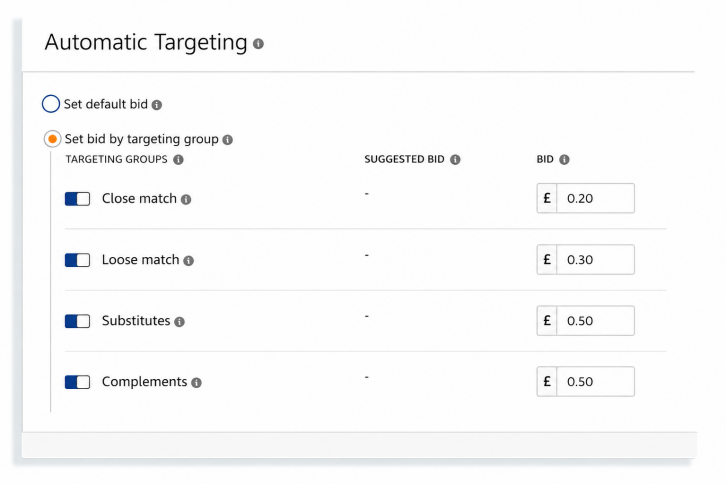
Amazon groups traffic into four targeting categories:
| Targeting Group | Description |
|---|---|
| Close Match | Searches closely related to your product |
| Loose Match | Broader searches with similar intent |
| Substitutes | Similar competing products |
| Complements | Products commonly purchased together |
You can use the same bid across all targeting groups, but many sellers prefer to adjust bids based on performance. If Close Match traffic is driving more sales, it may make sense to bid more aggressively there and less on lower-converting groups such as Complements.
What Is Manual Targeting?
With manual targeting, you choose the keywords or products you want to target. This gives you more control because bids can be adjusted for individual targets based on performance.
When setting bids in a manual campaign, you’ll typically see three options:
- Suggested Bid: Amazon’s recommended starting point based on recent winning bids. For sellers who don’t know how much to bid, it is recommended to go with this choice.
- Default Bid: The base bid that would be automatically applied to all keywords or products within an ad group.
- Custom Bid: A specific bid set by the seller to an individual keyword or product target which overrides the ad group’s default bid.
Many sellers use Amazon’s suggested bid as a starting point, then adjust default and custom bids over time based on performance.
Once you’ve chosen what to target and how much you’re willing to bid, the next step is deciding how Amazon should manage those bids during an auction.
Amazon Bidding Strategies Explained
While your bid sets the maximum amount you’re willing to pay, your bidding strategy determines how Amazon uses that bid to compete in auctions. The strategy you choose can directly impact your overall campaign performance.
Amazon offers three default bidding strategies across its Sponsored Ads campaigns:
- Dynamic Bids: Down Only
- Dynamic Bids: Up and Down
- Fixed Bids
In addition, Amazon provides advanced options such as Rule-Based Bidding (Target ROAS) for eligible campaigns.
Let’s start with the most conservative bidding option available in Amazon Ads.
Dynamic Bids: Down Only
With Dynamic Down Only, Amazon can lower your bid when it believes a shopper is less likely to buy your product. However, it will never increase your bid above the amount you’ve set. In some cases, Amazon may reduce your bid by up to 100%, meaning your ad may not be shown for that particular search. This helps limit spending on clicks that are less likely to result in a sale.
Many sellers start with Dynamic Down Only because it offers some automation while helping control advertising costs. The downside is that you may miss opportunities to win highly competitive searches where a higher bid could have improved visibility.
If you’re looking for more automation, Dynamic Up and Down gives Amazon greater flexibility to adjust your bids.
Dynamic Bids: Up and Down
With Dynamic Up and Down, Amazon can both lower and raise your bids based on how likely a shopper is to convert. If Amazon believes a click has a strong chance of leading to a sale, it may increase your bid to help you win the auction. If the likelihood of a sale is lower, it may reduce your bid.
Depending on the situation, Amazon can increase or decrease your bid by up to 100% to compete more aggressively for high-value opportunities or spend less on clicks that are less likely to generate a sale.
This strategy is often used for products with a proven sales history because Amazon has enough data to make better bidding decisions. While it can help increase visibility and sales, it can also lead to higher advertising costs if not monitored closely.
Some sellers prefer to keep full control over their bids instead of letting Amazon adjust them automatically.
Fixed Bids
With Fixed Bids, Amazon uses the exact bid you set and does not automatically adjust it, giving you the most control and predictability because you always know how much you’re bidding.
Many sellers use Fixed Bids when launching new products, testing campaigns, or evaluating keyword performance. The trade-off is that Amazon cannot automatically increase bids when valuable opportunities arise or lower them when conversion likelihood drops.
Amazon also offers advanced bidding options for sellers who want more automation and performance optimization.
Rule-Based Bidding (Target ROAS)
Rule-Based Bidding allows Amazon to automatically adjust bids to help you reach a specific Return on Ad Spend (ROAS) goal. Instead of manually changing bids, you tell Amazon the level of return you’d like to achieve, and Amazon adjusts bids based on campaign performance.
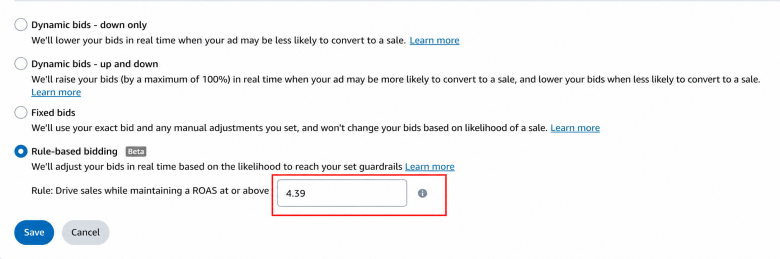
This strategy is available only for Sponsored Products campaigns and can be used with Automatic Targeting, Keyword Targeting, or Product Targeting campaigns.
Before you can use Target ROAS bidding, your campaign must:
- Have been running for at least 10 days
- Generate at least 10 conversions within the last 30 days
- Meet Amazon’s minimum daily budget requirement for your marketplace
Because Target ROAS relies on historical performance data, it works best for established campaigns rather than newly launched products.
Each bidding strategy has its own strengths and trade-offs. The best choice depends on your goals, budget, and how much control you want over your bids.
AI-Bidding vs Amazon Bidding Strategies Comparison
While Amazon’s bidding strategies provide some level of automation, they still rely on predefined rules and often require ongoing monitoring as campaigns grow. AI-bidding takes automation a step further by continuously analyzing performance data and adjusting bids in real time, helping sellers reduce manual work, respond faster to changing conditions, and scale campaigns more efficiently.
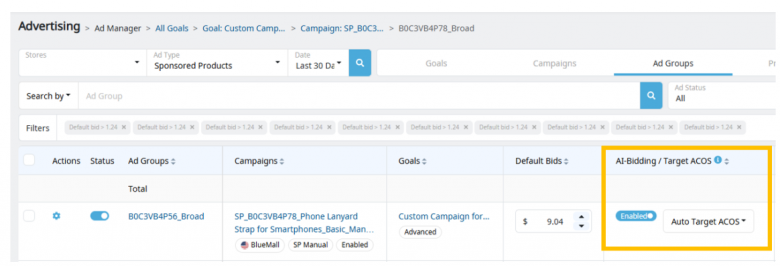
The table below compares the strengths and limitations of each bidding approach, including how AI bidding differs from Amazon’s standard bidding options.
| Feature | Dynamic Down Only | Dynamic Up & Down | Fixed Bids | Rule-Based Bidding | AI Bidding |
|---|---|---|---|---|---|
| Automation Level | Medium | Medium | Low | High | Very High |
| Budget Control | High | Medium | High | Medium | High |
| Conversion Optimization | Good | Excellent | Limited | Excellent | Excellent |
| Seller Learning Curve | Low | Medium | Low | Medium | Low |
| Scalability | Medium | Medium | Medium | High | Very High |
| Best For | New advertisers | Growth campaigns | Testing | ROAS goals | Large-scale optimization |
Factors That Influence Amazon PPC Bid Optimization
Audience and Placement
When trying to set a bid, consider the value of the audience and where your ads appear. Many advertisers bid more aggressively for keywords that attract new customers and for Top of Search placements, where higher visibility often leads to stronger conversion rates and sales.
Match Types, Timing, and Seasonality
Not all keywords deserve the same bid. Many sellers bid more aggressively on exact-match keywords because they tend to be more targeted and easier to measure. Broad-match keywords are used to discover new opportunities, so sellers may be more experimental when bidding on them.
Timing matters, too. During major events like Prime Day, Black Friday, and Cyber Monday, competition typically increases as more sellers compete for the same customers. To maintain visibility during these high-traffic periods, many advertisers increase their bids and budgets accordingly.
Advanced Amazon Bid Optimization Techniques
Use Search Data to Improve Efficiency
A common strategy is to use automatic campaigns to discover high-converting search terms, then move those terms into manual campaigns where bids and budgets can be managed more strategically. At the same time, negative keywords help eliminate irrelevant traffic, allowing more of your ad spend to go toward searches that are actually driving sales.
Common optimization techniques include:
- Moving high-converting search terms from automatic campaigns into manual campaigns
- Increasing bids on proven search terms
- Adding negative keywords to prevent wasted spend
- Reducing budget allocation to low-performing searches
To check for high converting search terms, check the search query performance report on Amazon Ads console.
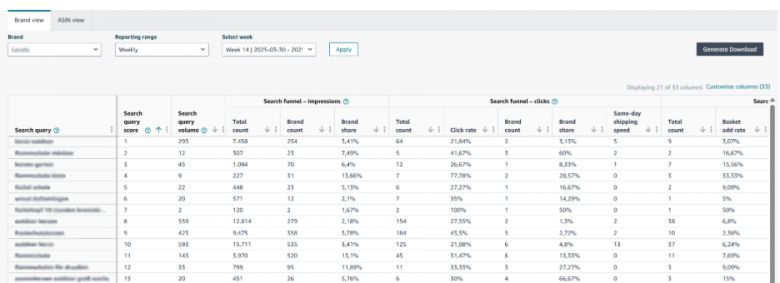
To learn more about how to analyze reports for high-converting terms, check out this blog.
Adjust Bids Based on Audience and Placement
A keyword that consistently attracts new customers may justify a higher bid than one that mainly generates repeat purchases. Likewise, different ad placements often produce very different results.
When optimizing bids, consider:
- Increasing bids for keywords that consistently attract new-to-brand customers
- Reviewing Top of Search, Product Pages, and Rest of Search performance separately
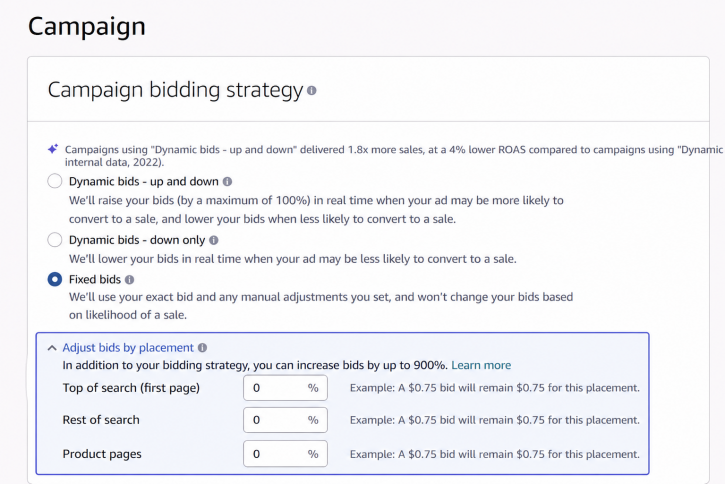
- Allocating more budget toward placements with stronger conversion rates
- Reducing bids on placements that generate clicks but not sales
Adjust Bids for Different Match Types
Different keyword match types often require different bidding approaches.
For example:
- Exact Match: Often receives higher bids because searches are highly relevant and performance is easier to predict
- Phrase Match: Balances reach and control, making it useful for growing bands
- Broad Match: Commonly used for keyword discovery and identifying new opportunities
Use Schedule Bid Rules to Stay Competitive
Shopper behavior can vary by hour, day, season, and event. During periods of higher purchase intent, many sellers temporarily increase bids to maintain visibility and capture additional demand.
Common examples include:
- Increasing bids during historically high-converting hours of the day
- Increasing bids on weekends when shopping activity is higher
- Increasing bids during promotional date ranges
- Increasing bids during major shopping events such as Prime Day, Black Friday, and Cyber Monday
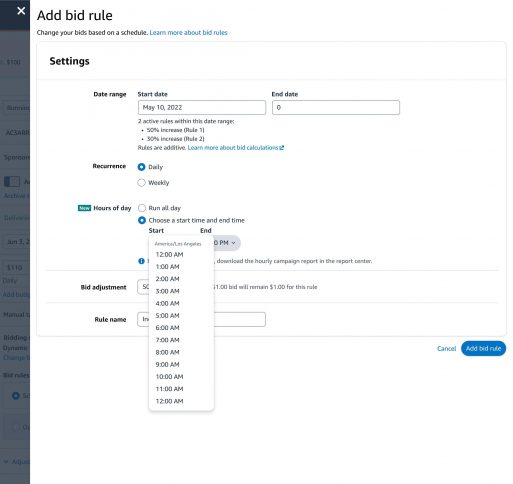
Amazon Schedule Bid Rules allow you to automate these adjustments instead of making them manually.
Schedule Bid Rules can be applied to the following bid strategies:
- Dynamic Bids: Up and Down
- Dynamic Bids: Down Only
- Fixed Bids
Why Amazon Bid Management Requires Ongoing Optimization
Advertising Conditions Change Constantly
When running Ads, your competition changes as new products enter the market and shopper behavior evolves, all of which can quickly shift campaign performance. That’s why sellers who run Amazon ads regularly review key metrics such as CPC, CTR, conversion rate, ACoS, ROAS, TACoS, and total sales to help determine how you should adjust your bids.
Scaling Makes Manual Optimization Harder
As campaigns scale, bid management becomes more time-consuming. Managing hundreds of keywords across multiple campaigns can make it difficult to react quickly to performance changes. For many brands, the challenge goes from knowing what to optimize to having enough resources to do it consistently.
Why You Should Use AI-Bidding In Your Amazon PPC Strategy
Managing a handful of keywords is easy, but managing hundreds across multiple campaigns is a different story. By the time many sellers analyze reports and make changes, the marketplace has already changed. This delay can make it harder to scale and consistently hit your advertising goals.
This is why many sellers are turning to AI bidding. Using AI tools can help you identify optimization opportunities much faster. For sellers with a larger inventory, this means greater efficiency and less time spent managing bids.
How BQool AI Advertising Automates Bid Optimization
AI Bidding Agent and Auto-Budgeting Feature
With BQool’s AI-Ads, AI Bidding Agent can continuously adjust bids based on campaign goals, while Auto-Budgeting helps direct your ad spend toward the best performing campaigns. Together, these features can reduce manual work and improve overall campaign efficiency.
Check out how this seller cut ACoS by 54% using BQool AI Ads.
Conclusion
Whether you’re using Dynamic Bids, Rule-Based Bidding, or AI-powered automation, success comes from continuously testing and refining your approach. However, as campaigns grow, keeping up with bid adjustments becomes increasingly difficult. AI-powered tools can help sellers respond faster to changing conditions, reduce manual workload, and allocate ad spend more efficiently.