Managing a few Amazon PPC campaigns manually may not seem difficult. But as your account grows, so does the work behind it.
More products create more campaigns. More campaigns create more keywords, product targets, bids, budgets, search terms, and performance data to review.
At some point, the challenge is no longer knowing what to do. It is finding enough time to do it consistently.
That is where Amazon PPC software comes in.
This guide explains what Amazon PPC software does, what parts of PPC management can be automated, and what to look for when choosing a tool.
Overview
- What Is Amazon PPC Software?
- Why Do Sellers Use Amazon PPC Software?
- What Can Amazon PPC Software Automate?
- Amazon PPC Software vs the Amazon Ads Console
- When Does Amazon PPC Software Make Sense?
- When PPC Software May Not Solve the Problem
- How to Choose Amazon PPC Software
- Other Decisions to Consider
- Automate More of Your PPC Workflow with BQool Advertising
- Key Takeaway
- FAQ
What Is Amazon PPC Software?
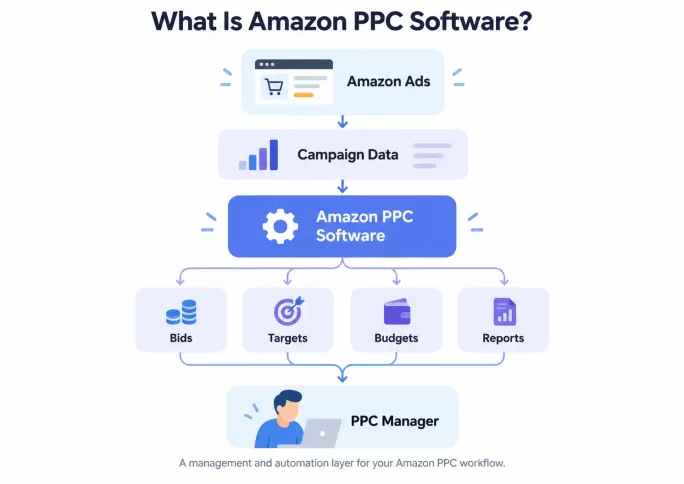
Amazon PPC software helps sellers manage, analyze, and optimize Amazon advertising campaigns alongside the Amazon Ads console.
Depending on the platform, it may help with:
- Adjusting bids
- Finding keyword and product-target opportunities
- Adding negative targets
- Managing campaign budgets
- Creating and organizing campaigns
- Monitoring performance
- Building reports for internal teams, managers, or clients
Some tools mainly make campaign data easier to review and manage. Others use predefined rules, algorithms, or AI to automate certain decisions.
The important distinction is:
PPC software does not replace campaign strategy. It helps advertisers execute PPC work more consistently at scale.
You still need to decide what good performance means for your business and what each campaign is trying to achieve.
Why Do Sellers Use Amazon PPC Software?
Amazon PPC management often starts simple. You launch a few campaigns, check performance, adjust some bids, and review search terms every few days.
Then the account grows.
A few campaigns become dozens. Each one generates more targets, search terms, bids, budgets, and performance data to review.
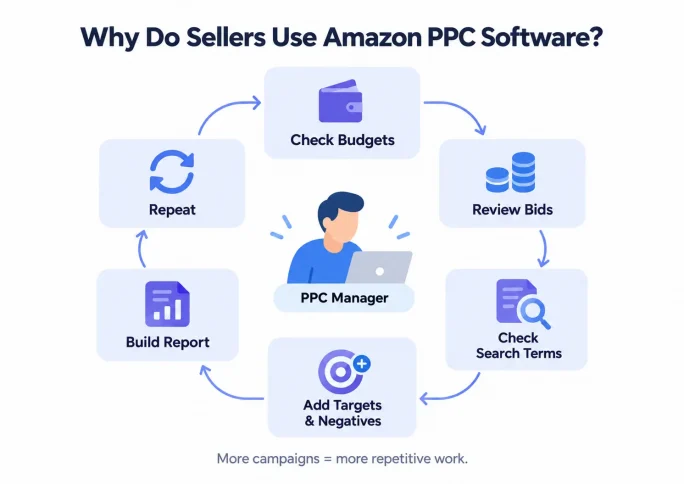
A task that once took 20 minutes can turn into hours of repetitive work.
That is where PPC software becomes useful.
Advertisers usually turn to software for five broader reasons:
- Scalability: manage more campaigns without increasing manual work at the same rate
- Consistency: apply the same decision process across campaigns and targets
- Efficiency: spend less time on repetitive checks and updates
- Responsiveness: react to performance changes without waiting for the next manual review
- Visibility: monitor performance and communicate results more easily
Amazon PPC software becomes most useful when campaign complexity grows faster than the time available to manage it.
What Can Amazon PPC Software Automate?
Not every PPC tool automates the same work.
Before comparing tools, first understand which parts of PPC management you actually want help with.
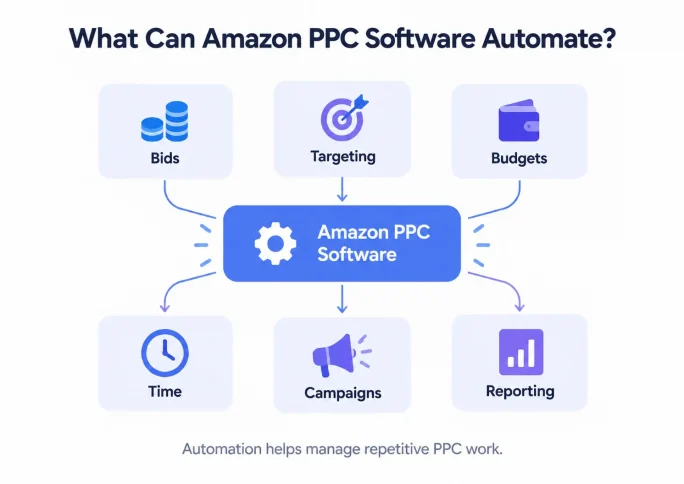
1. Bid Management
Bid automation helps adjust target-level bids based on campaign performance and goals.
It becomes especially useful when you manage large numbers of keywords or product targets and cannot review every bid consistently.
Automation can scale bid execution, but it cannot fix poor targeting or weak conversion.
2. Keyword, Product & Negative Targeting
Amazon search term optimization can review which shopper searches and product interactions are worth targeting, and which should be excluded.
PPC software can help turn that data into actions by identifying:
- Keyword opportunities
- Product-target opportunities
- Negative keywords
- Negative product targets
The goal is not simply to add more targets. It is to improve traffic quality with less manual review.
3. Budget Management
A campaign that performs well but regularly runs out of budget may have room to capture more demand.
An inefficient campaign that runs out of budget has a different problem.
Budget automation can help shift available budget toward stronger campaigns, reducing the need for constant manual reallocation.
The goal should be smarter allocation, not simply higher spending.
4. Campaign Creation & Management
Automation is not only about optimization.
Software may also help advertisers:
- Build campaigns faster
- Apply settings in bulk
- Manage multiple campaigns or marketplaces
- Review changes in one place
The value here is operational efficiency rather than direct performance improvement.
5. Time-Based Bid Decisions
Campaign performance may vary by day of week or time of day.
Some PPC tools can use these patterns as additional signals for bid decisions, reducing the need to repeatedly analyze performance and maintain schedules manually.
For accounts with enough data, time becomes another factor in deciding how aggressively to bid.
6. Reporting & Performance Monitoring
Optimization is only part of PPC management. Someone still has to explain what happened.
Advertisers may regularly need to answer questions such as:
- How much did we spend and sell?
- Is efficiency improving?
- Which campaigns changed?
- What should we do next?
PPC software can help consolidate data, monitor trends, and turn campaign performance into reports.
Useful reporting features may include:
- Performance dashboards
- Historical trends
- Campaign and target-level views
- Change history
- PDF or spreadsheet exports
- Customizable reports
For PPC managers, reporting is not separate from campaign management. It is part of the job.
Amazon PPC Software vs the Amazon Ads Console
You do not need third-party software to run Amazon Ads.
The Amazon Ads console already provides campaign creation, targeting, bidding, budgeting, performance data, and reporting.
Third-party software adds another layer for automation, analysis, and workflow management.
| Amazon Ads Console | PPC Software |
|---|---|
| Direct campaign management | Additional management layer |
| Manual review and changes | Automated or assisted decisions |
| Native reports | Consolidated dashboards and reporting |
| Manual search-term review | Automated harvesting may be available |
| Manual budget decisions | Budget automation may be available |
For a small account, Amazon’s own tools may be enough.
Third-party software becomes more valuable when repetitive work starts getting in the way of consistent decision-making.
When Does Amazon PPC Software Make Sense?
You do not need automation simply because you run Amazon Ads.
PPC software may make sense when:
- Campaign reviews are becoming inconsistent
- Repetitive management takes too much time
- Search-term or targeting opportunities are being missed
- Reporting requires too much manual work
- Account complexity is growing faster than your team can manage
A better question than “Do I need software?” is:
What problem would the software solve that is difficult to manage manually today?
When PPC Software May Not Solve the Problem
Not every PPC problem is an automation problem.
Software may not solve weak performance if:
- Your product page or offer does not convert
- Your targeting does not match shopper intent
- Your campaign goals or product economics are unclear
- Your campaigns do not have enough data
Automation can make execution faster.
It cannot turn a weak strategy into a strong one.
That is why visibility and control matter just as much as automation.
How to Choose Amazon PPC Software
Once you know why you need software, comparing tools becomes much easier.
Do not start with the longest feature list.
Start with the work you actually need help managing.
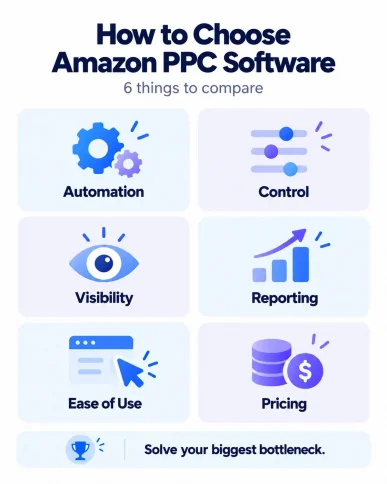
1. Automation Coverage
Does the software support the workflows you need?
For example:
- Bidding
- Keyword and product harvesting
- Negative targeting
- Budget allocation
- Dayparting
- Campaign creation
- Reporting
More automation is not automatically better.
The features that matter are the ones that solve your actual workload.
Not sure where to start? Our guide to Amazon PPC automation explains which workflows to automate first.
2. Control
Can you decide what gets automated and override changes when needed?
Look for the ability to:
- Enable automation selectively
- Set goals or guardrails
- Override bids or targets
Automation should reduce repetitive work without taking away the decisions you still want to own.
3. Transparency
Can you see what changed, when it changed, and why?
Useful features may include:
- Change history
- Automated-action logs
- Previous bid or budget values
You should not have to treat automation like a black box.
4. Reporting & Performance Visibility
Good reporting should help you answer three questions quickly:
- What changed?
- What needs attention?
- How is performance trending?
If you report to managers or clients, also check whether the tool supports the exports and customization you need.
5. Ease of Use
A tool designed to save time should not create another management burden.
Consider:
- Setup
- Learning curve
- Dashboard clarity
- Bulk actions
- Marketplace management
- Support and onboarding
The most advanced tool is not necessarily the most useful one.
It needs to fit the way you actually work.
6. Pricing & Scalability
Pricing may vary by ad spend, account count, feature access, or service level.
A tool that works financially today should still make sense as your account grows.
Evaluate the cost against the management time and capabilities it replaces—not simply against the cheapest alternative.
Other Decisions to Consider
Choosing PPC software can also raise a few broader questions.
Each deserves a deeper comparison, so we will keep them simple here.
Rule-Based vs AI-Powered Automation
Some PPC software follows predefined rules.
Others use algorithms or AI to adapt decisions based on performance data.
Rule-based automation can offer more predictable logic, while AI-based systems may incorporate more signals and adjust decisions dynamically.
Neither is automatically better.
The more useful question is how much control, transparency, and adaptability you need.
PPC Software vs Manual Management
Manual management can work well for smaller accounts or advertisers who want direct control over every change.
As the number of campaigns, targets, and recurring decisions grows, software can make the workload easier to scale.
The question is not whether software is always better.
It is:
Is manual management still practical for your account?
Learn more about Amazon PPC software vs manual management and when switching to automation makes sense.
PPC Software vs Managed Service
Software and managed services solve different problems.
PPC software helps automate or simplify execution while you remain responsible for strategy.
A managed service takes on more of the analysis, strategy, and day-to-day execution.
Sellers who want control but need more efficiency may prefer software.
Those who lack time or PPC expertise may prefer hands-on management.
Compare Amazon PPC software vs a PPC agency to decide whether you need a tool or a team to manage your campaigns.
Automate More of Your PPC Workflow with BQool Advertising
BQool Advertising brings several recurring PPC workflows into one platform:
- AI-Bidding: automate bid decisions
- AI-Harvesting: identify targeting and negative opportunities
- Auto Budgeting: reallocate campaign budgets
- Campaign Builder: speed up campaign setup
- Ad History: review automated changes
- Dashboard & Reporting: monitor and share performance
Instead of spending hours repeating the same PPC tasks, automation can help handle more of the execution while you stay focused on campaign strategy.
Key Takeaway
Amazon PPC software becomes most valuable when account complexity starts growing faster than your ability to manage it manually.
Start with the bottleneck.
Identify what consumes the most time, decide what you are comfortable automating, and choose a tool that gives you both efficiency and control.
FAQ
What is Amazon PPC software?
Amazon PPC software helps advertisers manage, analyze, and optimize Amazon advertising campaigns. Depending on the platform, it may support bid automation, targeting, budget management, campaign creation, monitoring, and reporting.
Do I need Amazon PPC software?
Not necessarily. Smaller accounts can often be managed directly through Amazon’s advertising tools. Software becomes more useful as campaign volume and recurring management work increase.
What can Amazon PPC software automate?
Depending on the tool, automation may include bids, keyword and product harvesting, negative targeting, budget allocation, dayparting, campaign creation, monitoring, and reporting.
Can Amazon PPC software automatically find keywords?
Some tools can analyze campaign and search-term data to identify new keyword or product-target opportunities. This process is commonly known as keyword or target harvesting.
Is AI PPC software better than rule-based software?
Not automatically. Rule-based and AI-powered systems work differently. The better choice depends on the level of control, transparency, adaptability, and automation you want.
Does PPC software replace a PPC manager?
Usually not. Software can automate recurring execution, but advertisers still need to define campaign goals, interpret performance, and make strategic decisions.