Launching an Amazon PPC campaign is only the beginning.
Once the campaign starts collecting data, optimization is about answering three questions:
- What is working?
- What is limiting performance?
- What should you change next?
The third question depends on the first two.
If impressions are low, raising the budget may not help. If shoppers click but do not buy, changing bids may not solve the real problem. And if a campaign already spends inefficiently, giving it more budget can simply create more inefficient spend.
Good Amazon PPC optimization starts with diagnosis before action.
Overview
- Amazon PPC Optimization in 30 Seconds
- What Is Amazon PPC Optimization?
- Start With Your Campaign Goal
- Find Where Performance Is Breaking Down
- Step 1: Check Product and Ad Delivery First
- Step 2: Improve the Quality of Your Traffic
- Step 3: Adjust Bids Based on Performance
- Step 4: Review Budget After Traffic Quality
- Step 5: Check Conversion When Clicks Do Not Become Sales
- Step 6: Measure ACoS in Context
- What About Placement and Dayparting?
- When Does Amazon PPC Automation Make Sense?
- Common Amazon PPC Optimization Mistakes
- Key Takeaway
- Frequently Asked Questions
Amazon PPC Optimization in 30 Seconds
| What You See | Check First | Possible Next Step |
|---|---|---|
| Very low impressions | Eligibility, targeting, bids | Fix delivery or relevance, then evaluate bids |
| Impressions but few clicks | Target relevance, product offer | Improve traffic relevance or product appeal |
| Clicks but few sales | Search terms, targeting, product detail page | Refine traffic or improve conversion |
| Sales but high ACoS | CPC, conversion, target performance | Reduce inefficient spend |
| Campaign runs out of budget | Traffic quality and ACoS | Remove waste before adding budget |
| Campaign performs well but has low volume | Coverage, bids, budget | Look for controlled ways to scale |
The goal is not to change everything at once.
Find the constraint, make the change that addresses it, then measure again.
What Is Amazon PPC Optimization?
Amazon PPC optimization is the ongoing process of improving how efficiently a campaign reaches its goal.
That can involve:
- Improving targeting
- Reviewing search terms
- Adjusting bids
- Removing inefficient traffic
- Managing budget
- Improving conversion
- Expanding campaigns that already perform well
Optimization does not always mean lowering ACoS.
A new product campaign may accept higher advertising costs while it builds visibility and collects data. A mature product with tight margins may need a much stricter efficiency target.
The right optimization decision depends on what the campaign is supposed to achieve.
Start With Your Campaign Goal
Before changing bids, targets, or budgets, define what good performance means for the campaign.
For example, a campaign may be designed to:
- Launch a new product
- Discover new search terms
- Generate profitable sales
- Increase sales volume
- Reach shoppers around competing products
- Grow within a target ACoS
The same performance data can lead to different decisions depending on that goal.
A higher ACoS may be acceptable during product discovery but unsustainable for a campaign focused on profit.
Without a goal, optimization can become a series of disconnected changes.
Find Where Performance Is Breaking Down
A simple way to diagnose Amazon PPC is to follow the path from visibility to sale:
Impressions → Clicks → Product Detail Page → Orders → Advertising Efficiency
Each stage answers a different question.
| Stage | Question |
|---|---|
| Impressions | Is the ad getting enough opportunities to appear? |
| Clicks | Are relevant shoppers interested enough to visit the listing? |
| Conversion | Are those shoppers buying after they click? |
| Cost | How much are you paying for that traffic? |
| ACoS / ROAS | Is the result aligned with the campaign goal? |
Do not jump to the last metric before understanding what happened earlier in the path.
A high ACoS, for example, is an outcome. The underlying cause may be expensive clicks, weak conversion, poor targeting, or a combination of them.
Step 1: Check Product and Ad Delivery First
Before changing advertising settings, make sure the advertised product can compete effectively.
Check basic issues such as:
- Product availability
- Sponsored Products eligibility
- Featured Offer eligibility
- Price and offer competitiveness
- Product detail page quality
A retail problem can look like an advertising problem.
For example, if a product receives clicks but suddenly stops converting after its price increases, lowering the bid may reduce spend—but it does not fix the reason shoppers stopped buying.
Start by confirming that the campaign and the product are healthy enough to optimize.
Step 2: Improve the Quality of Your Traffic
Once delivery looks healthy, check whether the campaign is attracting the right shoppers.
Amazon’s Search Term Report shows the search terms that generated at least one ad click and can help identify both high-performing searches and traffic that does not support your goals.
Look for patterns such as:
- Search terms generating consistent sales
- Relevant terms worth managing more directly
- Queries consuming spend without enough return
- Irrelevant traffic
- Product targets that consistently perform well or poorly
The action depends on what the data shows.
A strong search term may be worth adding as a more controlled target. Poor or irrelevant traffic may call for negative targeting.
You do not need to make those decisions from one click or one order. Look for enough evidence to identify a meaningful pattern.
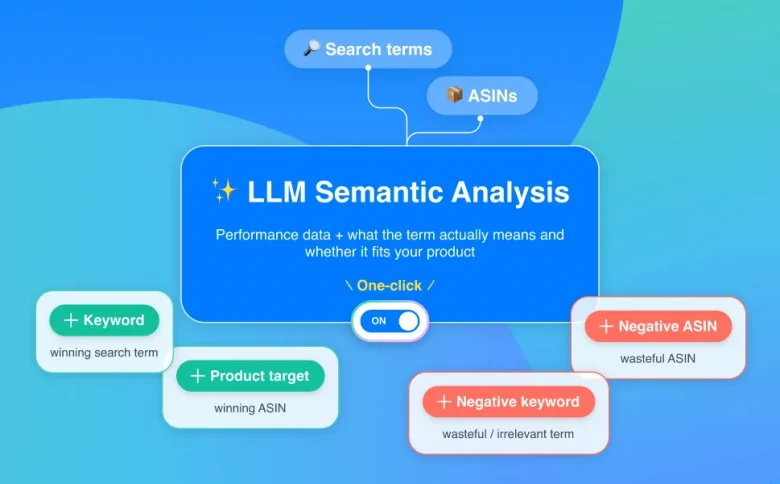
As campaigns grow, reviewing and moving search terms or product targets manually can become repetitive. BQool’s AI-Harvesting can automate this workflow by identifying useful keyword and product opportunities while also adding negative targets based on performance.
Step 3: Adjust Bids Based on Performance
After confirming that the traffic itself makes sense, look at what you are paying for it.
Your bid affects how competitively a target can compete in the auction. But before raising or lowering it, first ask what is actually going wrong.
- Is the target getting traffic but not sales?
The problem may be relevance or conversion, not the bid. - Is the target generating sales but spending too much to get them?
The bid may be too aggressive for your ACoS goal. - Is the target converting efficiently but getting very little traffic?
A higher bid may give it more opportunities to compete. - Is the target barely getting impressions or clicks?
Check relevance and eligibility before assuming the bid is too low.
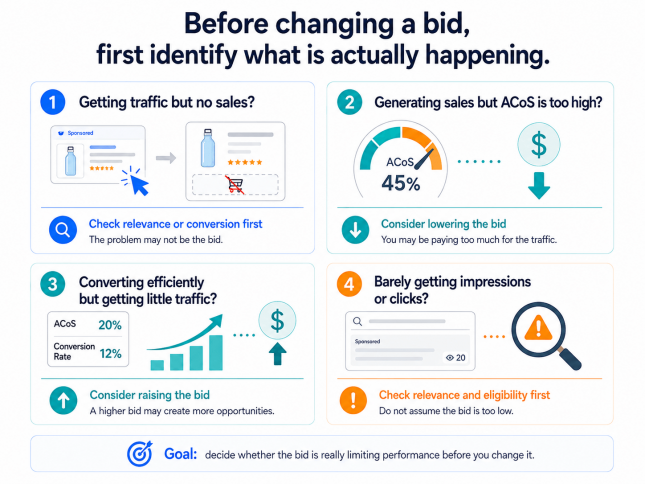
A lower bid can reduce how aggressively you compete, but it cannot fix poor targeting or weak conversion. Likewise, a higher bid may create more opportunities, but it cannot make an irrelevant target relevant.
The goal is to identify whether the bid is actually limiting performance before changing it.
If bid is the right lever, the next question is how much you can afford to bid and how large the adjustment should be. See our Amazon Bidding Strategy guide for starting bids, bid adjustments, bidding strategies, and placement bidding.
Step 4: Review Budget After Traffic Quality
A campaign running out of budget is not automatically a signal to increase it.
First ask:
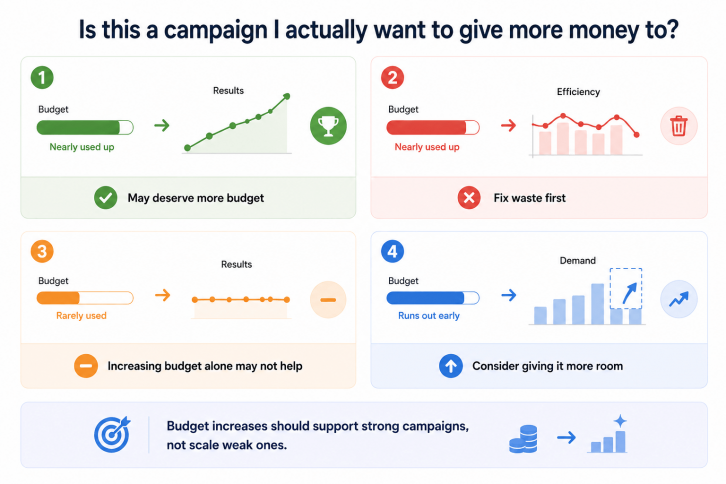
Is this a campaign I actually want to give more money to?
Then look at what is happening:
- Is the campaign running out of budget while meeting your performance goal?
It may have room for more budget. - Is it running out of budget but spending inefficiently?
Fix the wasted spend before giving it more money. - Does the campaign rarely use its full budget?
Increasing the budget alone is unlikely to create more traffic. - Is a strong campaign losing opportunities because its budget runs out early?
Increasing its budget may help it capture more of the available demand.
Budget controls spending capacity, not efficiency. Giving an inefficient campaign more budget can simply scale the problem.
The goal is to determine whether budget is actually limiting a campaign that deserves more room to grow.
If budget is the right lever, the next question is how much the campaign needs and how much additional spend you can support. See our How Much Should I Spend on Amazon Ads? guide for daily budget planning, budget adjustments, and scaling decisions.
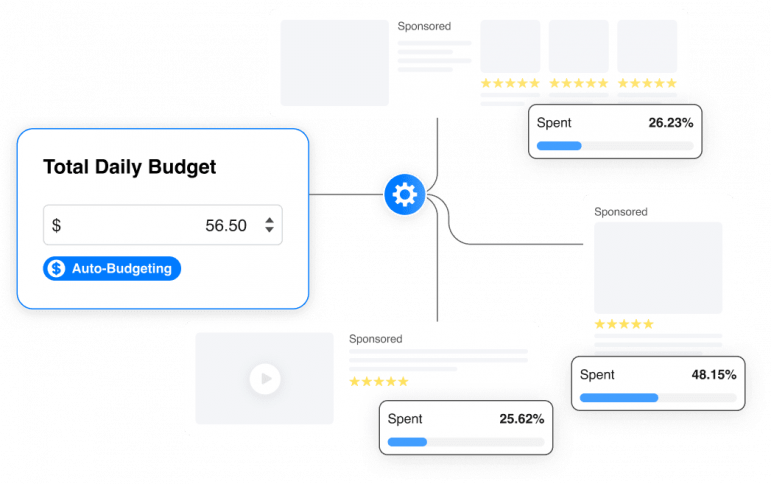
For sellers managing multiple campaigns, budget allocation can also become a recurring optimization task. BQool’s Auto Budgeting can automatically shift budget toward stronger-performing campaigns, helping keep productive campaigns active without requiring constant manual budget monitoring.
Step 5: Check Conversion When Clicks Do Not Become Sales
If a campaign generates relevant clicks but few orders, the problem may no longer be primarily about getting traffic.
The shopper has already reached the product detail page.
Now ask whether the offer gives them enough reason to buy.
Check factors such as:
- Price
- Images
- Reviews and ratings
- Product title and key information
- Offer competitiveness
- Inventory
- Product-market fit
This is why PPC optimization does not stop inside the advertising console.
A campaign can deliver relevant shoppers efficiently and still perform poorly if the listing does not convert them.
Changing bids can control how much you pay for those clicks. It cannot make the product detail page convert.
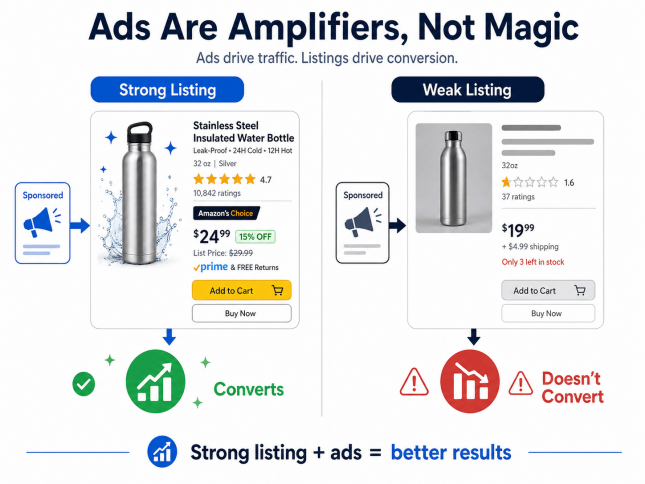
If you need help diagnosing both advertising and conversion problems, BQool’s Amazon Ads Management Service combines campaign optimization with hands-on guidance from an experienced PPC team, including recommendations for improving product listings.
See how BQool combined PPC management and listing recommendations in this Amazon Ads customer success story.
Step 6: Measure ACoS in Context
After making changes, evaluate whether performance is moving toward the campaign goal.
ACoS is one of the most common Amazon PPC metrics:
ACoS = Ad Spend ÷ Ad Sales × 100
But a lower ACoS is not automatically better in every situation.
For example:
- Lowering bids may improve ACoS but reduce sales volume.
- Expanding targeting may temporarily increase ACoS while uncovering new demand.
- A profitable high-margin product may tolerate a different ACoS than a low-margin product.
The important question is:
Is the campaign producing an acceptable result for this product and this goal?
For break-even ACoS, benchmarks, and profitability context, see our Amazon ACoS guide.
What About Placement and Dayparting?
Targeting, bids, and budget are not the only dimensions that can affect PPC performance.
Placement
Sponsored Products performance can differ depending on where ads appear, such as Top of Search, Rest of Search, or Product Pages.
Amazon provides placement reporting so advertisers can compare performance across placements and evaluate whether placement-level bid adjustments make sense.
Placement optimization deserves its own analysis because the question is not simply:
Which placement gets more sales?
It is:
Which placement produces results that justify what I am paying for it?
Dayparting
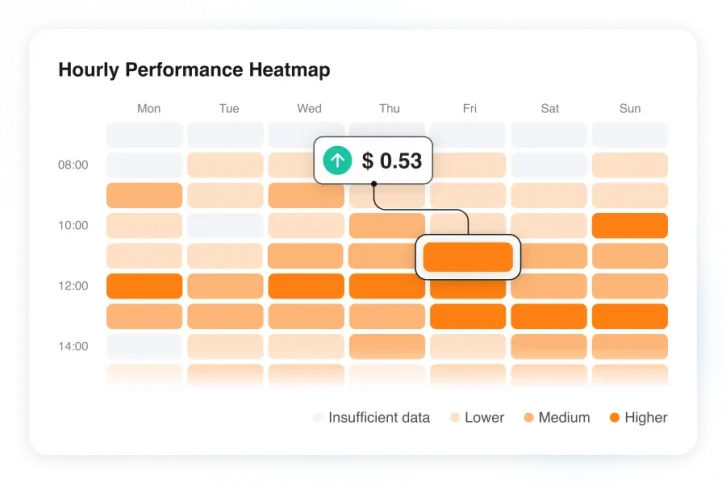
Performance may also change by day of week or time of day.
Dayparting adjusts how aggressively you bid based on when your ads tend to perform better or worse.
In practice, manual dayparting can be difficult for beginners. You need enough performance data to compare different days and times, identify meaningful patterns, decide which periods deserve higher or lower bids, and continue updating those decisions as performance changes.
BQool’s AI-Bidding automates this process. It analyzes historical advertising performance by day of week and time of day, then adjusts bidding based on those patterns.
Higher-performing periods can receive more aggressive bids, while lower-performing periods can be bid more conservatively, without requiring you to build hourly schedules or manage separate dayparting rules manually.
When Does Amazon PPC Automation Make Sense?
Manual optimization becomes harder as the number of campaigns, keywords, ASINs, and decisions grows.
Automation becomes most useful when:
- The campaign goal is already clear
- The decision logic is repeatable
- Enough performance data exists
- Manual review is becoming difficult to perform consistently
Common repetitive workflows include:
- Adjusting bids toward an ACoS goal
- Reviewing large numbers of targets
- Identifying useful search terms or ASINs
- Adding negative keyword or product targets
- Reallocating budget across campaigns based on performance
- Applying decisions across many campaigns
BQool Advertising automates several parts of this workflow:
- AI-Bidding adjusts bids based on performance and your ACoS goal.
- AI-Harvesting identifies useful keyword and product opportunities while adding negative targets.
- Auto Budgeting helps allocate budget toward stronger-performing campaigns.
Automation does not replace campaign strategy. You still need to decide what good performance means for your products.
It helps execute those decisions more consistently as the amount of manual work grows.
Common Amazon PPC Optimization Mistakes
Changing Too Many Things at Once
If you change targeting, bids, budget, and listing content at the same time, it becomes harder to understand what caused the result.
Make deliberate changes where possible and evaluate what happens next.
Treating Bids as the Answer to Every Problem
Low traffic does not always mean the bid is too low.
High ACoS does not always mean the bid is too high.
Check relevance and conversion before assuming price is the problem.
Increasing Budget Before Removing Waste
More budget gives a campaign more capacity to spend.
It does not make the spend more efficient.
Fix obvious inefficiency before deciding whether the campaign deserves more budget.
Optimizing Only for ACoS
ACoS is useful, but it is not the campaign goal by itself.
A lower ACoS with sharply lower sales is not necessarily an improvement.
Evaluate efficiency together with sales volume, margin, and the role of the campaign.
Making Decisions From Too Little Data
One click, one order, or one bad day can create noise.
Optimization should respond to meaningful patterns rather than isolated results.
Key Takeaway
Amazon PPC optimization is not about finding one setting that makes every campaign perform better.
It is a repeated decision process:
Set the goal → Find the constraint → Make the relevant change → Measure again
Start with product and delivery health. Then evaluate traffic quality, bids, budget, conversion, and efficiency in that order.
As campaigns grow, automation can help repeat those decisions more consistently—but the logic behind the decisions still matters.
Frequently Asked Questions
What Is Amazon PPC Optimization?
Amazon PPC optimization is the ongoing process of improving campaign performance by reviewing targeting, search terms, bids, budget, conversion, and advertising efficiency.
How Do You Optimize an Amazon PPC Campaign?
Start by identifying the campaign goal and locating where performance is breaking down. Then adjust the factor most closely connected to the problem rather than changing every campaign setting at once.
How Often Should You Optimize Amazon PPC?
There is no single review frequency that fits every campaign.
Campaigns with more traffic collect meaningful data faster than low-volume campaigns. Review performance regularly, but base changes on enough data to support the decision rather than a fixed number of days.
How Can I Reduce Amazon PPC ACoS?
High ACoS can come from several causes, including high CPC, poor conversion, or inefficient traffic.
Identify which factor is driving the problem before lowering bids or adding negative targets.
Should I Increase the Budget When an Amazon PPC Campaign Runs Out?
Not automatically.
First check whether the campaign is meeting its performance goal. If it is efficient and budget-limited, more budget may create room to grow. If it is inefficient, remove waste before increasing spend.
What Should I Do if My Amazon Ads Get Clicks but No Sales?
Check whether the traffic is relevant and whether the product detail page is converting shoppers effectively.
Search terms, targeting, price, reviews, images, offer competitiveness, and product-market fit can all affect the path from click to sale.
Can Amazon PPC Optimization Be Automated?
Parts of it can.
Bid adjustments, search-term harvesting, negative targeting, and budget allocation can all be automated when campaigns have enough data and a clear goal.