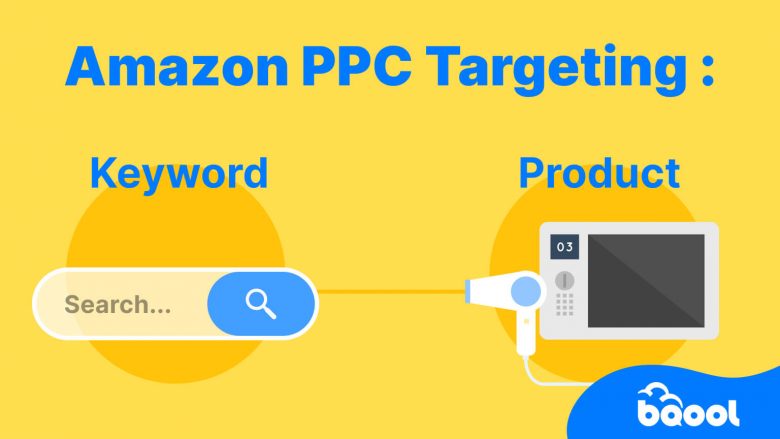
When you create a manual Sponsored Products campaign, you choose one of two targeting methods:
- Keyword targeting: You select keywords.
- Product targeting: You select specific products or product categories.
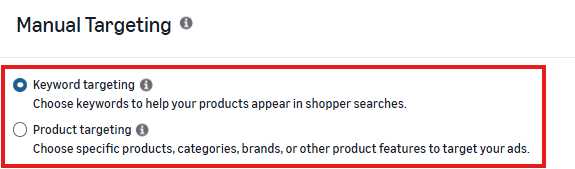
Both methods help Amazon determine when your ad may be eligible to appear, but they give you different ways to control that targeting.
So which one should you use?
That depends on whether you want to manage advertising opportunities through keywords or through products and categories.
Overview
- Amazon PPC Targeting in 30 Seconds
- How Targeting and Ad Placement Work Together
- What Is Amazon Keyword Targeting?
- How Do Amazon Keyword Match Types Work?
- What Is Amazon Product Targeting?
- What Is ASIN Targeting?
- What Is Category Targeting?
- ASIN Targeting vs Category Targeting
- What Is Expanded Product Targeting?
- When Should You Use Keyword Targeting?
- When Should You Use Product Targeting?
- Can You Use Keyword and Product Targeting Together?
- How Do You Find Products to Target?
- What Is Negative Targeting?
- How Search Terms Help Improve Keyword and Product Targeting
- When Does Targeting Automation Make Sense?
- Common Amazon PPC Targeting Mistakes
- Which Targeting Method Should You Choose?
- Frequently Asked Questions
Amazon PPC Targeting in 30 Seconds
| Keyword Targeting | Product Targeting | |
|---|---|---|
| What do you target? | Keywords | Products or categories |
| Main controls | Keywords + match types | ASINs + categories |
| Example target | “32 oz insulated water bottle” | A competing bottle ASIN |
| Possible placements | Shopping results + product pages | Shopping results + product pages |
| Useful when | You know which keywords matter | You know which products or categories matter |
Amazon’s Sponsored Products targeting guidance explains that manual campaigns can use either keyword targeting or product targeting.
How Targeting and Ad Placement Work Together
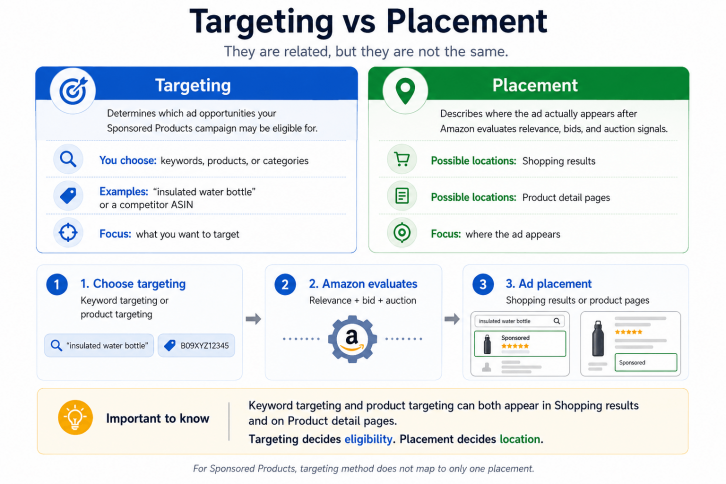
Targeting and placement are related, but they are not the same thing.
Targeting determines which advertising opportunities your ad may be eligible for. Placement describes where the ad actually appears.
For Sponsored Products, both keyword-targeted and product-targeted ads can appear in shopping results and on product detail pages.
This means:
- Keyword targeting does not mean your ads only appear in search results.
- Product targeting does not mean your ads only appear on product detail pages.
The main difference is how you define the target.
With keyword targeting, you choose keywords.
With product targeting, you choose products or categories.
Where the ad ultimately appears also depends on factors such as relevance, bids, auction conditions, and available Sponsored Products placements.
What Is Amazon Keyword Targeting?
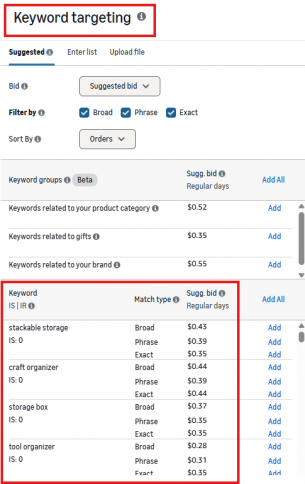
Keyword targeting lets you select words or phrases that Amazon can use to match your Sponsored Products ads with relevant shopping activity.
For example, if you sell a 32 oz insulated stainless steel water bottle, you might target:
- insulated water bottle
- stainless steel water bottle
- 32 oz water bottle
- water bottle with straw
Keywords vs Search Terms
A keyword and a search term are not the same thing.
Keyword: What you choose to target.
Search term: What the shopper actually types.
For example:
Keyword: insulated water bottle
Search term: 32 oz insulated water bottle for gym
Your match type helps determine how closely shopper searches need to relate to the keyword you selected.
For more detail on the traffic your ads actually receive, see our Amazon Search Term Report guide.
How Do Amazon Keyword Match Types Work?
Sponsored Products supports three keyword match types:
- Broad
- Phrase
- Exact
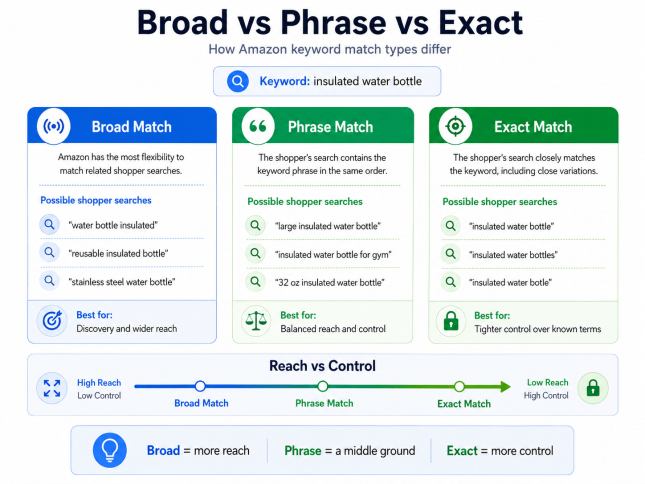
Each match type offers a different balance between reach and control, which affects how broadly Amazon can match your keyword with shopper searches.
| Match Type | Reach | Control | Useful For |
|---|---|---|---|
| Broad | Higher | Lower | Discovery and wider keyword coverage |
| Phrase | Medium | Medium | More focused reach |
| Exact | Lower | Higher | More controlled targeting of known terms |
Broad Match
Broad match gives Amazon the most flexibility to connect your keyword with related shopper searches.
Keyword: insulated water bottle
Possible shopper searches:
- water bottle insulated
- reusable insulated bottle
- stainless steel water bottle
Broad match can help you discover relevant searches beyond the exact keyword you entered. Because the matching is broader, reviewing your search terms is especially important.
Phrase Match
Phrase match requires the shopper’s search to contain your keyword phrase in the same order, while allowing additional words around it.
Keyword: insulated water bottle
Possible shopper searches:
- large insulated water bottle
- insulated water bottle for gym
- 32 oz insulated water bottle
Phrase match gives you more control than broad match while still allowing shoppers to add words before or after your keyword phrase.
Exact Match
Exact match is the most restrictive of the three match types. The shopper’s search needs to closely match your keyword, including supported close variations.
Keyword: insulated water bottle
Possible shopper searches:
- insulated water bottle
- insulated water bottles
- insulated water botle
Exact match gives you tighter control over the searches connected to your keyword, making it useful when you already know which terms matter.
But more control does not automatically mean better performance. Broader match types can still help uncover relevant demand you have not identified yet.
What Is Amazon Product Targeting?
Product targeting lets you manually target:
- Specific products or ASINs
- Product categories
For example, if you sell an insulated water bottle, you might target:
- A competing insulated bottle
- A similar product shoppers may consider as an alternative
- A related product shoppers may use with your bottle
- A relevant product category
- Another product from your own catalog
Product targeting can help your ad become eligible when shoppers are browsing products or categories that are relevant to yours.
What Is ASIN Targeting?
ASIN targeting means selecting individual products as your product targets.
For example, instead of targeting: insulated water bottle
you could select the ASIN of a specific competing water bottle.
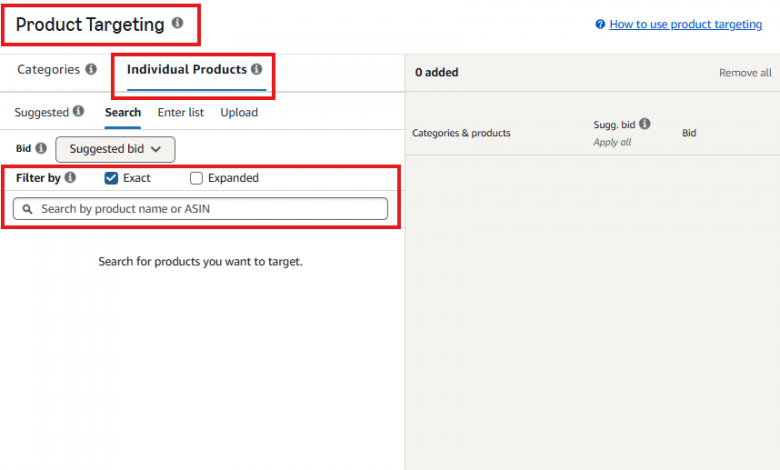
ASIN targeting can be useful when you already know which individual products are relevant to your campaign.
You might target:
- Direct competitors
- Similar alternatives
- Related products
- Products from your own catalog
The goal is not to target as many ASINs as possible. Focus on products where your advertised item makes sense as a relevant option for the shopper.
What Is Category Targeting?
Category targeting lets you target a broader group of products instead of selecting individual ASINs one by one.
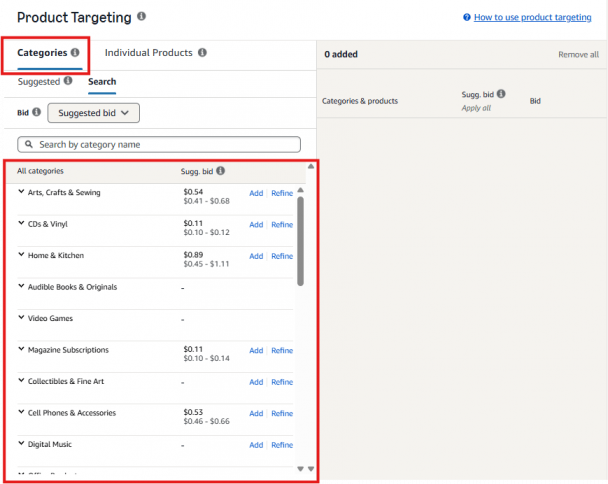
For example, rather than manually choosing dozens of insulated bottle ASINs, you might target a relevant product category.
Amazon also provides options to refine supported category targets using attributes such as brand, price, ratings, or other available filters.
Category targeting can be useful when you want broader coverage and do not need to control every individual product target.
ASIN Targeting vs Category Targeting
| ASIN Targeting | Category Targeting | |
|---|---|---|
| What you select | Individual products | A group of products |
| Scope | Narrower | Broader |
| Control | Higher | Lower |
| Useful when | You know specific products that matter | You want wider product coverage |
Use ASIN targeting when you want to control individual product opportunities.
Use category targeting when you want to reach a broader group of relevant products.
What Is Expanded Product Targeting?
Expanded product targeting gives Amazon more flexibility beyond the individual product you selected.
With standard product targeting, you select a product target.
With expanded product targeting, Amazon can also use that target to reach related product opportunities.
For example, Amazon explains that targeting a coffee maker may expand into products such as:
- Other substitute coffee makers
- Complementary products such as coffee filters
- Products commonly viewed or purchased with the selected item
You can read Amazon’s explanation in its expanded product targeting announcement.
Expanded targeting can increase reach and discovery, but it also gives Amazon more flexibility over which related products may trigger your ads.
When Should You Use Keyword Targeting?
Keyword targeting makes sense when:
- You know which keywords are relevant to your product
- You have keyword research or search-term data
- You want Broad, Phrase, or Exact match controls
- You want to manage bids around specific keywords
- You want to expand or refine keyword coverage
For example, if your campaign data shows that:
32 oz stainless steel water bottle
consistently performs well, keyword targeting lets you manage that term directly.
If you are still building your keyword list, see our guide on how to find keywords for Amazon PPC.
When Should You Use Product Targeting?
Product targeting makes sense when:
- You know which ASINs are relevant
- You know which competitors shoppers may consider
- You want to target specific products
- You want broader coverage across a category
- You want to promote related products within your own catalog
For example, if you know several competing bottles are strong alternatives to yours, you can test those products as individual ASIN targets.
If you need broader coverage, category targeting provides another option.
Can You Use Keyword and Product Targeting Together?
Yes, but not within the same Sponsored Products campaign.
When you create a manual Sponsored Products campaign, you choose either keyword targeting or product targeting.
If you want to use both, create separate campaigns.
For example:
Campaign A — Keyword Targeting
- 32 oz insulated water bottle
- stainless steel water bottle
- gym water bottle
Campaign B — Product Targeting
- Competitor ASIN A
- Competitor ASIN B
- Relevant water bottle category
Using both is not mainly about accessing different placements.
Instead, the two campaigns give you different ways to define and control advertising opportunities.
Use both when each campaign has a clear role.
How Do You Find Products to Target?
There are several ways to identify potential product targets.
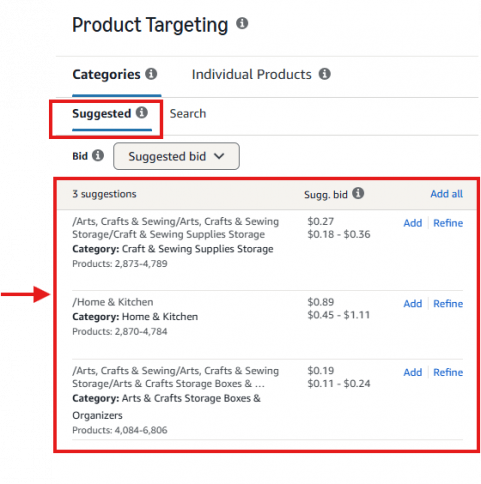
Amazon Suggestions
Amazon can suggest relevant products and categories when you create a campaign.
These suggestions can be a useful starting point, but you should still evaluate whether the products make sense for your goal.
Competitor Research
Look at products shoppers are likely to compare with yours.
Consider:
- Product type
- Features
- Price
- Ratings
- Positioning
- Use case
A useful question is:
Would someone considering this product reasonably consider mine as an alternative?
Campaign Data
Existing campaigns can also reveal product opportunities.
For example, an automatic campaign may surface products that generate useful traffic or sales. You can then decide whether those products deserve more direct control through a manual product-targeting campaign.
For more on that workflow, see our Amazon Automatic vs Manual Campaigns guide.
What Is Negative Targeting?
Targeting also includes deciding where you do not want your ads to compete.
Amazon supports negative targeting for Sponsored Products campaigns.
You may use negative targets when keywords or products repeatedly generate traffic that does not support your campaign goals.
Avoid excluding targets based on too little data.
For a deeper explanation, see our guide on how to find and use Amazon negative keywords.
How Search Terms Help Improve Keyword Targeting
Your targeting choices should improve as you collect data.
The search term report shows how shoppers actually reached your ads.
That data can help you identify:
- Search terms worth adding as keywords
- Keywords that need different match types or bids
- Irrelevant traffic
- Potential negative keywords
- New ways shoppers describe your product
A useful workflow is:
Target → Collect data → Review search terms → Refine targeting → Repeat
This turns targeting from a one-time campaign setup decision into an ongoing learning process.
When Does Targeting Automation Make Sense?
Keyword and product targeting become harder to manage as your campaigns collect more search-term and product-target data.
The challenge is no longer just finding opportunities. You also need to decide:
- Which search terms should become new keyword targets
- Which ASINs are worth adding as product targets
- Which poor-performing keywords should be excluded
- Which product targets should be added as negatives
Doing this manually across many campaigns can take a significant amount of time.
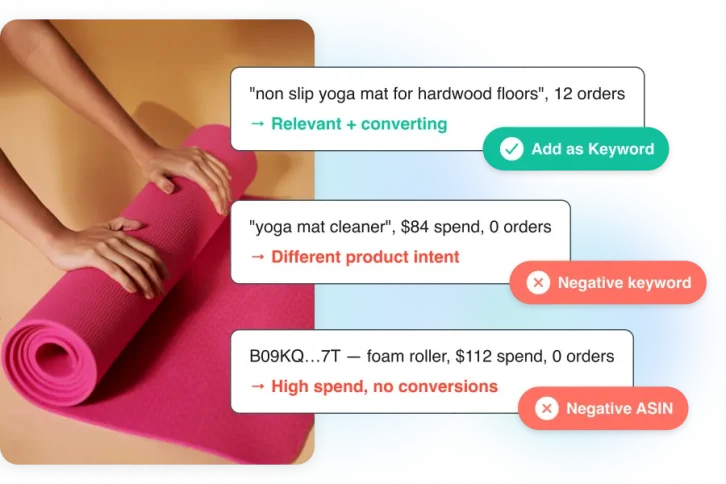
BQool’s AI-Harvesting is designed to automate this part of the targeting workflow. It can discover high-performing keywords and ASIN opportunities, add them as targets, and also add negative keyword or product targets based on performance.
This helps turn campaign data into targeting actions without requiring sellers to review and move every target manually.
Common Amazon PPC Targeting Mistakes
Confusing Targeting With Placement
Keyword targeting is not limited to search results, and product targeting is not limited to product detail pages.
Choose targeting based on what you want to control—not simply where you want the ad to appear.
Adding Too Many Targets Without a Clear Reason
More targets do not automatically create a better campaign.
Each keyword, ASIN, or category should support a clear advertising goal.
Using Only One Targeting Method by Default
Keyword and product targeting solve different targeting jobs.
You do not need to use both in every account, but choose based on the opportunities you want to control rather than habit.
Making Decisions From Too Little Data
Do not treat one click, one order, or one poor result as a complete performance pattern.
Give your targeting enough data to support the decision you are making.
Which Targeting Method Should You Choose?
| If you want to control… | Use |
|---|---|
| Keywords and match types | Keyword targeting |
| Individual products or ASINs | Product targeting |
| Broader groups of products | Category targeting |
| Both keyword and product opportunities | Separate campaigns for each |
There is no single targeting method that is right for every campaign.
Choose the method that gives you control over the opportunities that matter to your advertising goal.
Frequently Asked Questions
What Is Amazon PPC Targeting?
Amazon PPC targeting helps determine which advertising opportunities can make your ad eligible to appear.
For manual Sponsored Products campaigns, advertisers can choose keyword targeting or product targeting.
What Is the Difference Between Keyword and Product Targeting?
Keyword targeting lets you select keywords and match types.
Product targeting lets you select specific products, ASINs, or categories.
The main difference is what you choose as the target—not simply where the ad appears.
Does Keyword Targeting Only Appear in Amazon Search Results?
No. Keyword-targeted Sponsored Products can appear in shopping results and on product detail pages.
Does Product Targeting Only Appear on Product Detail Pages?
No. Product-targeted Sponsored Products can also appear across eligible Sponsored Products placements, including shopping results and product pages.
Can One Sponsored Products Campaign Use Both Keyword and Product Targeting?
No. A manual Sponsored Products campaign uses either keyword targeting or product targeting. If you want to use both, create separate campaigns.
What Are the Three Amazon Keyword Match Types?
Sponsored Products supports:
- Broad
- Phrase
- Exact
These match types control how closely relevant shopper searches need to relate to the keyword you selected.
What Is ASIN Targeting?
ASIN targeting means selecting an individual Amazon product as a product target.
It is part of product targeting, not a separate campaign type.
Can You Target Competitor ASINs?
Yes. You can select relevant competing products as individual product targets when they support your campaign strategy.
What Is the Difference Between a Keyword and a Search Term?
A keyword is what you choose to target.
A search term is what the shopper actually types.