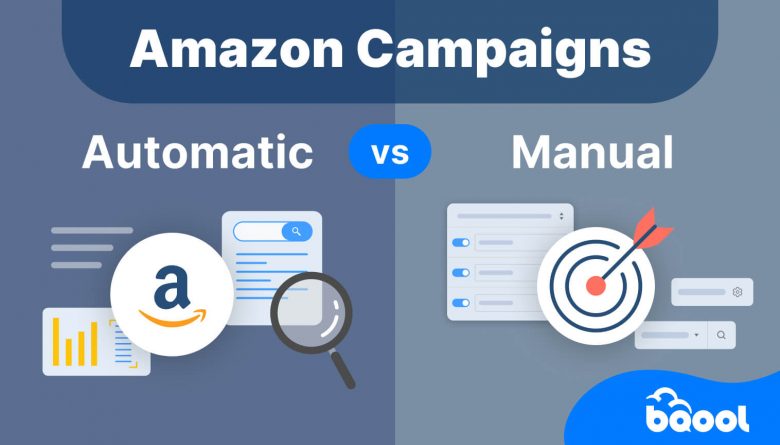
When you create an Amazon Sponsored Products campaign, one of the first decisions you make is whether to use automatic or manual targeting.
The difference is simple:
Automatic targeting lets Amazon decide which shopper searches and products may be relevant to your ad. Manual targeting lets you choose the keywords or products you want to target.
Neither option is always better.
Automatic campaigns can help you discover new opportunities with less setup. Manual campaigns give you more control once you know what you want to target.
For many sellers, the better strategy is not choosing one over the other. It is understanding what job each campaign should do.
Overview
- Amazon Automatic vs Manual Campaigns in 30 Seconds
- What Is an Amazon Automatic Campaign?
- How Does Amazon Automatic Targeting Work?
- What Are Automatic Campaigns Good For?
- What Is an Amazon Manual Campaign?
- Automatic vs Manual Campaigns: What Is the Real Difference?
- Should Beginners Start With Automatic or Manual Campaigns?
- How Automatic and Manual Campaigns Can Work Together
- Automatic vs Manual Campaign Example
- Common Automatic vs Manual Campaign Mistakes
- When Does Automation Make This Workflow Easier?
- Automatic or Manual: Which Should You Choose?
- Frequently Asked Questions
Amazon Automatic vs Manual Campaigns in 30 Seconds
| Automatic Campaign | Manual Campaign | |
|---|---|---|
| Who chooses the targets? | Amazon | You |
| Targets | Shopper searches and products Amazon considers relevant | Keywords, products, ASINs, or categories you select |
| Setup | Faster | Requires more input |
| Control | Less direct control | More control over individual targets |
| Best for | Discovery and learning | Controlling proven or planned targets |
| Can you set bids? | Yes, including bids by automatic targeting group | Yes, including bids for individual targets |
| Should you use both? | Often, yes | Often, yes |
Amazon itself recommends using a mix of automatic and manual targeting rather than treating them as mutually exclusive strategies.
What Is an Amazon Automatic Campaign?
In an automatic Sponsored Products campaign, Amazon uses information about your advertised product and shopping activity to match your ad with relevant shopper queries and products.
You do not need to build a keyword list before launching the campaign.
This makes automatic targeting one of the easiest ways for a new advertiser to start collecting data about how shoppers are finding products like yours. Amazon describes automatic targeting as a quick way to get started while gaining insights that can later inform your advertising strategy.
How Does Amazon Automatic Targeting Work?
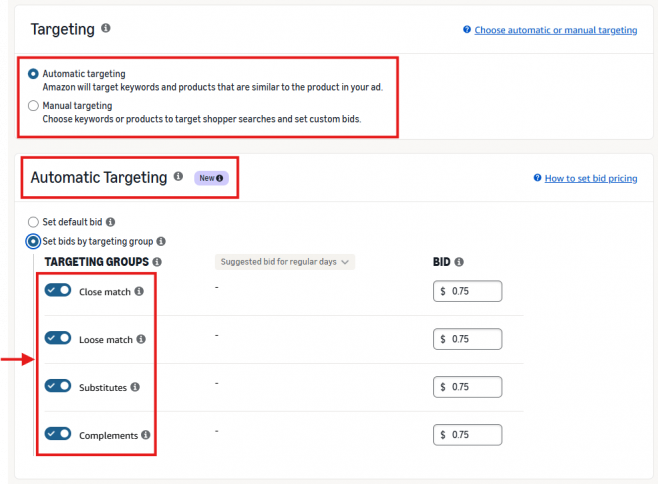
Amazon divides automatic targeting into four groups:
- Close match: Your ad may appear for shopping terms closely related to your product.
- Loose match: Your ad may appear for shopping terms more broadly related to your product.
- Substitutes: Your ad may appear around products that shoppers could consider instead of yours.
- Complements: Your ad may appear around products that complement yours.
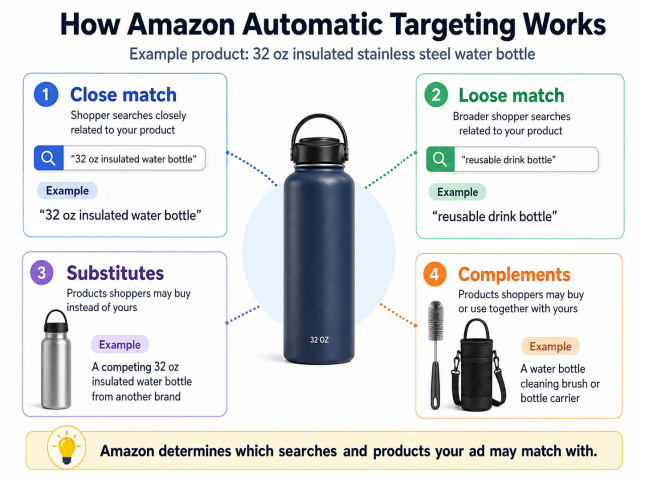
For example, imagine you sell an insulated stainless steel water bottle.
Amazon might connect your automatic campaign with:
- Close match: “32 oz insulated water bottle”
- Loose match: “reusable drink bottle”
- Substitute: A competing 32 oz insulated water bottle from another brand
- Complement: A water bottle cleaning brush or bottle carrier
Amazon determines which searches and products your ad may match with.
What Are Automatic Campaigns Good For?
Automatic campaigns are particularly useful when you want to:
- Launch a campaign quickly
- Discover search terms you did not think of yourself
- Find product or ASIN targeting opportunities
- Learn how Amazon connects your listing with shopper demand
- Gather data before building more controlled manual targeting
The main value of automatic targeting is discovery.
An automatic campaign can show you where demand exists. It does not mean every search term or product Amazon matches with your ad will be profitable.
That is why the work does not stop after launching the campaign.
What Is an Amazon Manual Campaign?
With manual targeting, you decide what you want your Sponsored Products ads to target.
Amazon allows advertisers to manually select keywords or products, giving sellers more control over individual targets and their bids.
Manual targeting generally falls into two categories:
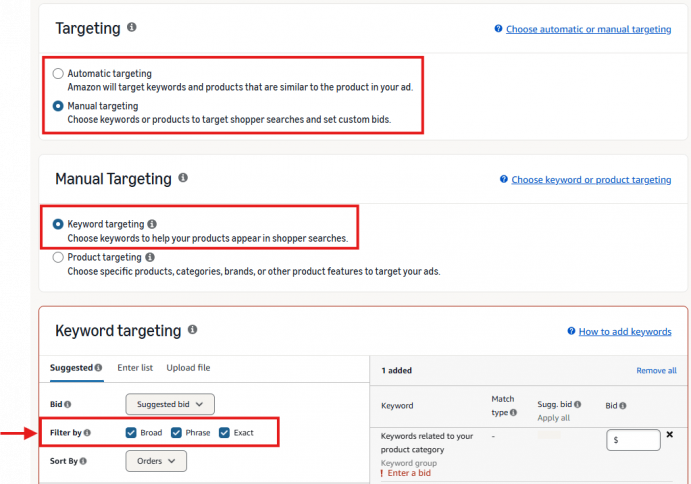
- Keyword targeting
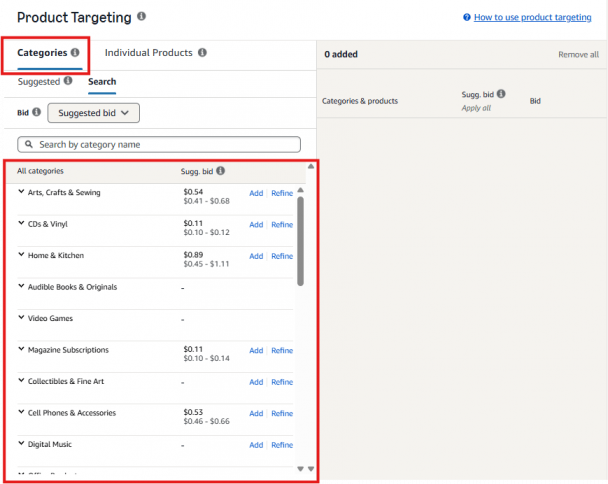
- Product targeting
Keyword Targeting
Keyword targeting lets you select the keywords shoppers may use when searching for products like yours.
For example, if you sell an insulated water bottle, you might target:
- insulated water bottle
- stainless steel water bottle
- 32 oz water bottle
You can then use broad, phrase, or exact match to control how closely shopper searches need to relate to your keyword.
If you are not sure which terms to target, see our guide on how to find keywords for Amazon PPC.
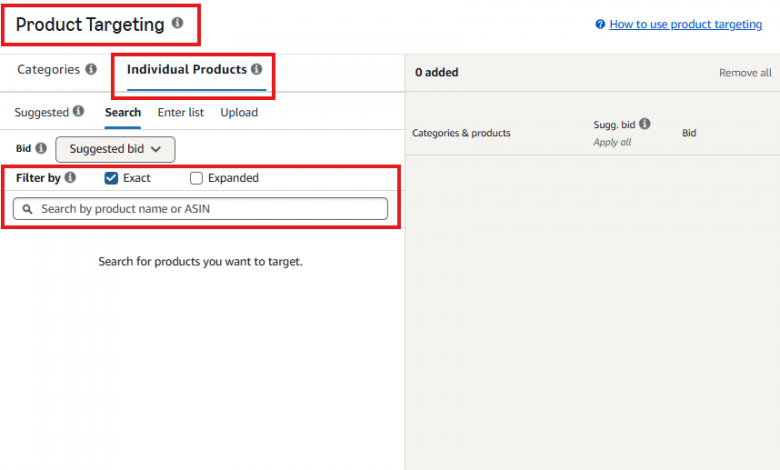
Product Targeting
Product targeting lets you target:
- Product categories
- Specific products or ASINs
For example, you might target a competing product that is similar to yours, or a product that shoppers commonly use together with yours.
Instead of asking:
“What words might the shopper search?”
you are asking:
“Which products or categories do I want my product to appear around?”
We will cover keyword targeting, product targeting, ASIN targeting, categories, and match types in more detail in our Amazon PPC Targeting: Keyword vs Product Targeting guide.
Automatic vs Manual Campaigns: What Is the Real Difference?
The biggest difference is who decides what the campaign targets.
With automatic targeting:
Amazon discovers matching opportunities for you.
With manual targeting:
You decide which opportunities you want to pursue.
That difference affects how you use the campaign.
Automatic Gives You More Discovery
You may not know every search term shoppers use for your product.
An automatic campaign can reveal:
- Unexpected long-tail searches
- Different ways shoppers describe your product
- Relevant competing products
- Complementary product opportunities
That makes it useful when your knowledge of the market is incomplete.
Manual Gives You More Control
Once you know which keywords or products matter, manual targeting lets you manage them more deliberately.
For example, you can:
- Select specific keywords
- Choose match types
- Target individual ASINs
- Set different bids for individual targets
- Build campaigns around different goals
Manual does not automatically mean better performance.
It means you have more control over the decisions.
If the targets you choose are poor, manual campaigns can still waste ad spend.
Should Beginners Start With Automatic or Manual Campaigns?
There is no rule that every new seller must start with automatic targeting.
Amazon recommends automatic targeting as an easy way for new advertisers to begin, and its getting-started guidance also suggests using automatic campaigns to discover shopping terms.
But the better choice depends on what you already know.
Start With Automatic Targeting When:
- You are new to Amazon PPC
- You do not have much keyword or product-target data yet
- You want to discover how shoppers find your product
- You want a simpler campaign setup
Start With Manual Targeting When:
- You already know important keywords
- You already know specific ASINs or categories you want to target
- You want tighter control over targeting and bids
- You are building a campaign around a specific strategy
Use Both When:
You want discovery and control at the same time.
This is often the most useful way to think about automatic vs manual campaigns.
Automatic campaigns can continue looking for opportunities, while manual campaigns focus on targets you have deliberately chosen.
How Automatic and Manual Campaigns Can Work Together
Automatic and manual campaigns do not need to compete for the same job.
A simple workflow looks like this:
Automatic campaign → Discover search terms and products → Review performance → Identify useful targets → Add proven targets to manual campaigns
For example:
You advertise an insulated bottle through an automatic campaign.
Amazon matches your ad with the shopper search:
“32 oz stainless steel water bottle with straw”
After enough data, you see that this search term repeatedly generates sales at an acceptable ACoS.
Instead of leaving that opportunity only inside the automatic campaign, you may decide to add it to a manual keyword campaign where you can control the keyword, match type, and bid more directly.
This process is often called keyword harvesting.
The same idea can apply to products or ASINs discovered through automatic targeting.
Use Search Term Data Before Moving Targets
Do not move every search term from an automatic campaign into a manual campaign.
The goal is to identify patterns that support a decision.
Amazon’s search term report shows the actual shopping queries that generated ad traffic and can help identify high-performing terms worth using in manual targeting.
Look for questions such as:
- Is this search term relevant to my product?
- Has it generated enough traffic to evaluate?
- Is it producing orders?
- Is its ACoS aligned with my campaign goal?
- Is it worth controlling separately?
For a step-by-step explanation, see our Amazon Search Term Report guide.
What Happens to Poor Search Terms?
Automatic campaigns can also reveal traffic you do not want.
For example, you may discover:
- Irrelevant shopper queries
- Products that generate clicks but consistently fail to convert
- Search terms that consume too much spend relative to sales
These are potential negative-targeting opportunities.
Negative targeting can prevent ads from appearing for specific keywords, products, or brands that do not support your campaign goals.
But avoid making decisions from too little data.
One click with no sale does not automatically make a search term bad.
Look for persistent patterns before excluding traffic.
For more detail, read our Amazon Negative Keywords guide.
Do You Need to Move a Winning Search Term Out of the Automatic Campaign?
Not necessarily.
“Harvesting” does not always mean you must completely stop the automatic campaign from accessing the same opportunity.
The important question is what role you want each campaign to play.
You may use the manual campaign to gain clearer control over a proven target while keeping automatic targeting active for continued discovery.
If overlapping traffic makes performance harder to interpret or conflicts with your campaign structure, negative targeting can be used more deliberately.
Avoid building complicated campaign structures only because you believe every target must exist in exactly one place.
Campaign structure should make decisions easier, not create extra maintenance.
Automatic vs Manual Campaign Example
Imagine you are launching a new stainless steel water bottle.
Automatic Campaign
You launch an automatic Sponsored Products campaign to learn how Amazon connects your product with shoppers.
Over time, you discover:
- “32 oz insulated water bottle” converts consistently
- “gym water bottle stainless steel” generates promising sales
- A competing bottle ASIN converts well
- “kids plastic water bottle” spends but is not relevant
Manual Campaign
You can then create more controlled targeting around the opportunities:
- Add “32 oz insulated water bottle” as a manual keyword
- Test “gym water bottle stainless steel”
- Target the high-performing competing ASIN
- Consider excluding irrelevant traffic such as “kids plastic water bottle”
The automatic campaign helped answer:
What opportunities exist?
The manual campaign helps answer:
Which opportunities do I want to control more deliberately?
That is the main reason these campaign types work well together.
Common Automatic vs Manual Campaign Mistakes
Assuming Automatic Campaigns Are Only for Beginners
Automatic targeting can continue to be useful even after you build mature manual campaigns.
It can keep discovering new search terms and product opportunities as shopper behavior changes.
Assuming Manual Campaigns Always Perform Better
More control does not guarantee better results.
Performance still depends on:
- Target quality
- Bids
- Product relevance
- Conversion
- Competition
- Campaign goals
A badly chosen manual keyword can waste just as much money as an irrelevant automatic match.
Moving Search Terms Too Quickly
A search term with a sale is not automatically a proven winner.
Look at enough performance data to determine whether the result is repeatable and aligned with your campaign goal.
Negating Too Quickly
Moving a target to manual does not automatically mean you must immediately negate it from automatic targeting.
Use negatives when they solve a clear problem.
Running Automatic Campaigns Without Reviewing Them
Automatic does not mean “set it and forget it.”
The value of discovery disappears if you never review what the campaign is finding.
Search terms, product targets, bids, negatives, and campaign performance still need attention.
When Does Automation Make This Workflow Easier?
The automatic-to-manual workflow is manageable when you have a small number of campaigns.
It becomes harder when you have to repeatedly:
- Review search terms
- Identify converting keywords or ASINs
- Move useful targets
- Add negative targets
- Adjust bids
- Repeat the same decisions across many campaigns
This is where PPC automation can reduce manual work.
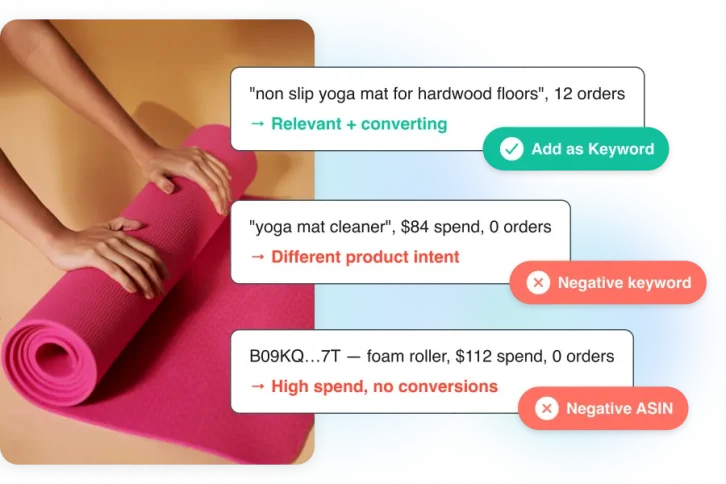
BQool’s AI-Harvesting is designed to help identify useful keyword and product targets while also adding negative keyword or product targets based on performance.
Automation does not replace campaign strategy. You still need to decide what performance goal matters and whether the overall campaign structure makes sense.
Automatic or Manual: Which Should You Choose?
If you only remember one thing, remember this:
Automatic targeting is useful for discovery. Manual targeting is useful for control.
You do not need to choose one forever.
Use automatic campaigns when you want Amazon to help uncover relevant shopper searches and products.
Use manual campaigns when you know which keywords, ASINs, or categories you want to manage more deliberately.
And when both jobs matter, use the two campaign types together—with a clear purpose for each.
Frequently Asked Questions
What Is the Difference Between Automatic and Manual Amazon PPC Campaigns?
Automatic campaigns let Amazon match your Sponsored Products ads with relevant shopper searches and products. Manual campaigns let you choose specific keywords, products, ASINs, or categories to target.
Are Automatic or Manual Amazon Campaigns Better for Beginners?
Automatic targeting is often easier for beginners because it requires less initial targeting research and can help discover opportunities. However, sellers who already know their important keywords or product targets can also start with manual campaigns.
Can You Run Automatic and Manual Amazon Campaigns at the Same Time?
Yes. Automatic campaigns can support discovery while manual campaigns give you more control over selected keywords or product targets. Amazon also recommends incorporating both automatic and manual targeting into your advertising strategy.
When Should You Move a Search Term From Automatic to Manual?
Consider moving a search term when you have enough data to show that it is relevant, performs consistently, and deserves more direct control over its keyword, match type, or bid.
Should You Negate a Keyword After Moving It to a Manual Campaign?
Not automatically. Negative targeting should solve a specific traffic or campaign-structure problem. Avoid negating a term simply because it also exists in a manual campaign.
Can Automatic Campaigns Target Products?
Yes. Amazon automatic targeting can match Sponsored Products ads with shopper searches as well as relevant product detail pages through its close match, loose match, substitutes, and complements targeting groups.